
The Candidate details provides information on the Candidate and the job they completed their assessments for. This includes Competency scores, Job fit, top 10% ranking, if applicable and both the three ‘Most likely strengths’ and three ‘Least likely strengths’. Additional information such as Onboarding insights and enhanced Reports may also be valuable for you in the recruitment and onboarding stage.
Accessing Candidate Overview
The Candidate Overview can be accessed in two ways. From the page of a specific recruitment:
-
Click on the three dots to the right of a Candidate you want to see the overview of.
-
Select Candidate Details.
From the Compare Candidate(s) page:
-
Click on 'Candidate Details' below any candidates name that you have selected to analyze.
Candidate overview information
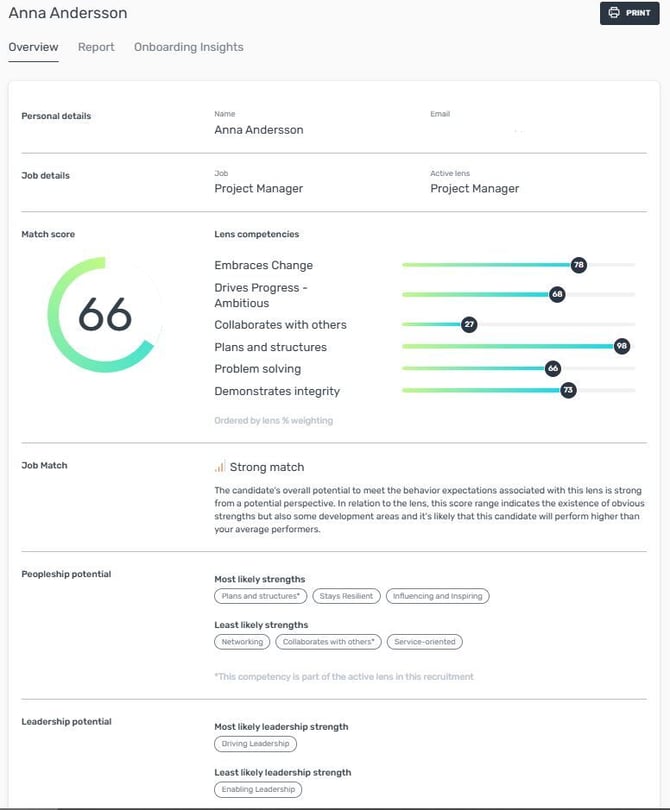
Personal details - The name and email address of the Candidate
Job details - The name of the job the candidate is connected to and the name of the Lens their results are matched against
Match score - The overall fit to the job based on the selected Lens and all scores for the competencies from within this Lens.
Job Match - An evaluation and description of the overall fit of the Candidate to the Job, based on the Match score and competency scores. This can be a Low Match, an Average Match, a Strong Match or a Very strong Match.
Assessio Ranking - This is only shown if the Candidate's Match score falls in the top 10% of scores for the lens that is used. Scores for all Assessio lenses have been computed based on a dataset of approximately 25,000 + candidates for various jobs.
Peopleship potential - The three competencies, from all 16 Peopleship competencies, with the highest competency score for this candidate and the three competencies with the lowest score. If the competency is part of the selected lens, this is indicated with an asterisk.
Leadership potential - The highest and lowest scoring Leadership competency for this candidate, from all 4 Leadership competencies.
Printing and downloading Candidate Overview
The Candidate Overview can easily be downloaded or printed:
-
Click on Print in the top right of the Candidate Overview.
-
Select a Destination; Select a printer to print to paper or select 'Save as PDF' to download as a PDF file.
-
Click Print or Save
Reports
There are five enhanced reports for you to deep-dive into; Match Report, Core Talents, Match + Core Talents, Learning Agility, and Match + Agility – making it easier for you to access the insights you need for every step of your recruitment process. Each template has its own focus. For example, the Match Report provides “Clear insights into role fit and alignment with the job”,whereas the Core Talents report helps you “Discover and leverage a person’s greatest strengths”. The goal of each template is emphasized in the platform.
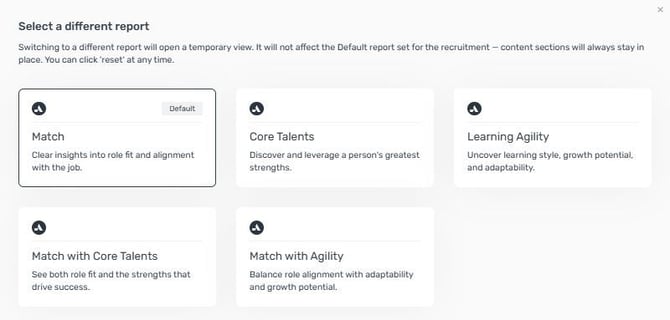
With these templates, you have greater flexibility and targeted information as you review candidates. The Match Report is the default for all recruitments using a competency-based lens, centering on the candidate’s match score for the specific role - providing you with clear, actionable insights critical for hiring decisions.
If you’re seeking a broader view, simply select the Core Talents template to explore a candidate’s performance across the 16 peopleship competencies, highlighting both strengths and areas for development. For those interested in understanding adaptability, the Learning Agility* template helps you uncover a candidate’s learning style, growth potential, and adaptability - ideal for fast-changing roles and future-oriented teams. For comprehensive understanding, the Match + Core Talents template offers a unified overview, showing both job fit and the wider context of each person’s potential. With the Match + Agility* template, you can balance role alignment with adaptability and growth potential, ensuring your hiring decisions support both immediate fit and future success.
Accessing Reports
Switching between templates is effortless within the Compare candidate page. With a single click, Administrators and Recruiters can move from one report to another during your review session. Any notes or summaries you create in a template are saved automatically, ensuring your work is never lost – even as you explore different perspectives. While the Match Report always resets as the default view when you return, your saved summaries and notes will immediately reappear when you revisit another template. Additionally, each report can be printed to share with colleagues or use in interviews.
Please note that recruitment members have access to the Match Report template only within the recruitment view. Additionally, the recruitment view does not allow any users to switch between templates.
Onboarding Insights
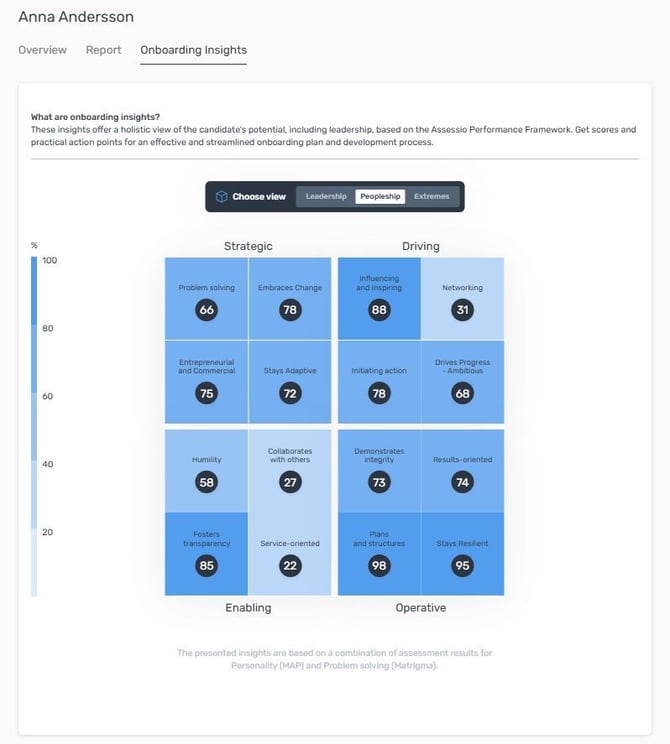
The aim of the onboarding insights is to help the organisation transition a person from Candidate to Employee and to develop that Employee to their full potential. Even before a hiring decision is made, this information is useful to see how the Candidate development can be supported. To see the Onboarding Insights, select Onboarding Insights at the top of the page, next to Reports.
There are four parts of Onboarding insights: Leadership, Peopleship, Extremes and Learning Agility*. By clicking on these options next to Choose View, different colored results from the assessments are presented. The darker the color, the higher the score, for Leadership and Peopleship results as well as Learning Agility. The darker the color the lower the risk of more extreme behaviors, for the result of Extremes.
By clicking any of the results, three tips will appear to develop behavior related to that result. These tips are aimed at management or HR and are intended to help the person who's Onboarding Insights are used. By clicking on Hide in the top right corner, the tips are hidden and the colors of the results are visible again.
Onboarding insights are based on the assessment outcomes for Personality (MAP) and General Mental Ability (Matrigma); Learning Agility also requires outcomes for Values* (Match-V) and will only be shown if these outcomes are available. All these factors are often very stable over time and the development tips are aimed at behavior, rather than on changing the outcomes of the assessments themselves.
*Learning Agility and Match-V is an add-on that needs to be activated by your organisation in order to use.