
- Forgotten password
In case you have forgotten your password, it is easy to set a new one as long as you have access to the email address that is linked to your username.
Follow this procedure to reset your password or receive a new link to create your account
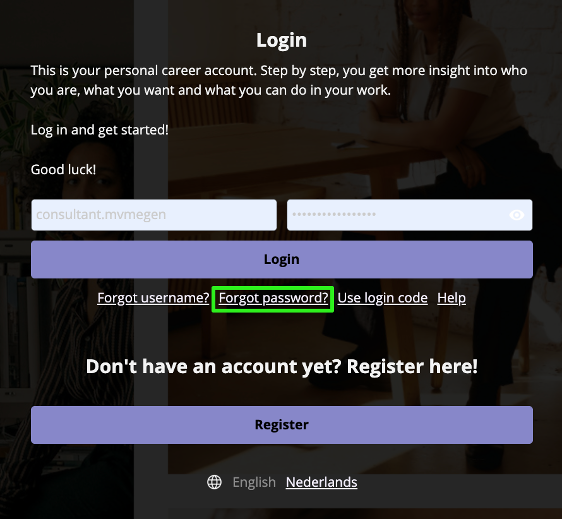
- Go to the Login page.
- Click on ‘Forgot password.
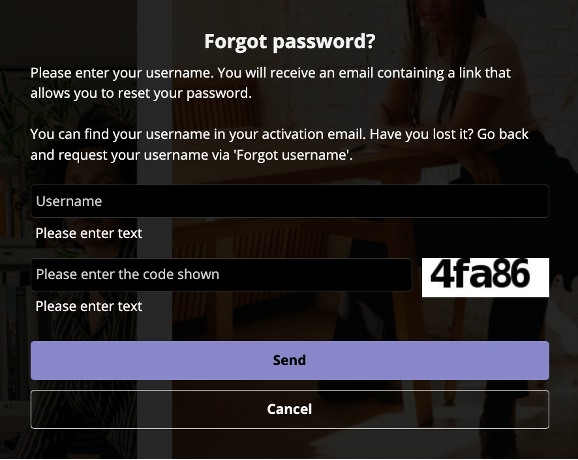
- Fill in your username.
- Fill in the code shown. If this is entered incorrectly, a new code will be generated for you to fill in.
- Click on ‘Send’.
An email will be sent to your email address. This may take a few minutes. Please note that the password reset link is valid for 30 days.
Be sure to check your spam folder if you cannot find the email. If you still have not received the email, please contact support.nl@assessiobloom.com.
- Open the email and click on Forgot password. This will open a new webpage where you can set your password.
- Follow the instructions to set a new password.
- Click on ‘Save’.
Now your password has been set. You can go back to the login page and login with your username and new password.