This document will hold all the relevant information about Assessio integration between Zuora, Vloxq and HubSpot.
Purpose of integration
The main purpose of the integration is to make it easy for sales and customer success to make new subscriptions or make changes to existing ones when changes in contract needs to happen.
All this without leaving the UI in HubSpot, as Zuoras UI is not fit for all sales and cs to work directly.
Table of content
-
High level architecture
-
Events covered by integration
-
Datamapping
-
The preparation work before integration started
High level architecture
The current integration can go two ways. From HubSpot to Zuora or from Zuora to HubSpot.
.png?width=670&height=441&name=image%20(2).png)
Main events covered in integration
-
New customer in HubSpot
-
Upgrade of an existing customer in HubSpot
-
Downgrade/Contraction with part of subscription that requires new contract
-
Ramp up deal - 1-3 years, different price and different products
-
Churn
-
Two way syncronization of subscription from Zuora to HubSpot object
1.New customer
A new customer can be created in Zuora, when a deal is moved to closed won in the "new logo pipeline" in HubSpot. This should trigger the creation of an account + order in Zuora with the corresponding subscriptions or one time charges on the line item level in HubSpot.
See full flow in flowchart here

Webhook trigger
When a deal is moved to closed won in the new logo pipeline or non-recurring i sold in new/existing customer pipeline, this workflow triggers in HubSpot, sending af webhook to Sunrise code to start fetching data and sending to Zuora.
Link to workflow Hubspotapp-eu1.hubspot.com/workflows/145462006/platform/flow/2060029121/edit
.png?width=670&height=433&name=image%20(3).png)
A short video and slide created for onboarding colleagues, can be seen here for new subscription customer and Non-recurring customer
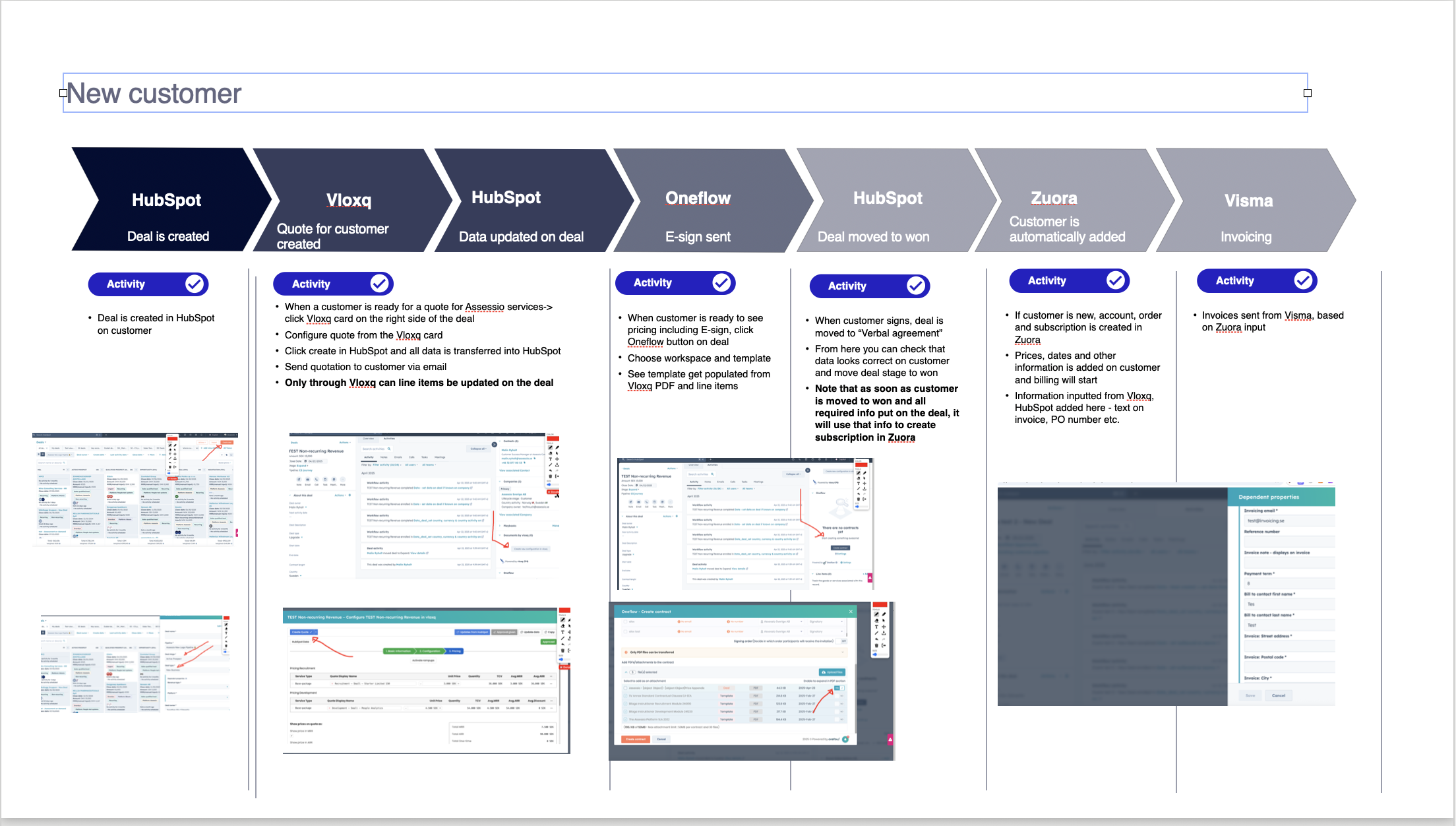
New customer flow
See flow in slides here
See video walkthrough of it all
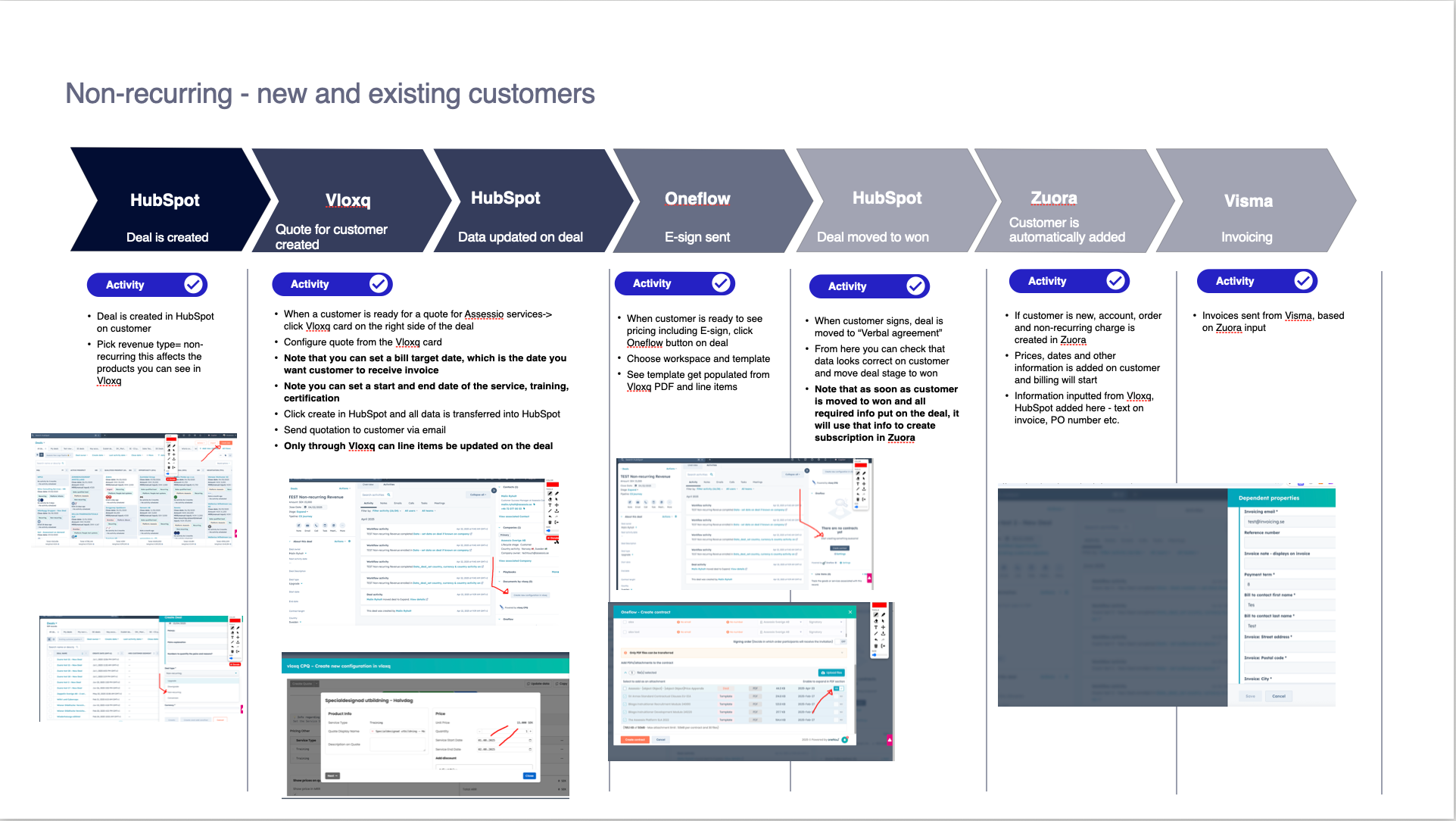
Non-recurring flow
See flow in slides here
.png?width=670&height=378&name=image%20(4).png)
See video walkthrough here
Assessio non recurring new flow
STEP BY STEP GUIDE
-
Create a new deal in the New logo pipeline
-
Choose Deal type and fill out mandatory fields
-
Move stages from Qualified prospect → Opportunity → Proposal → Negotiation and fill out mandatory fields
4. Click Vloxq button on deal
.png?width=670&height=393&name=image%20(5).png)
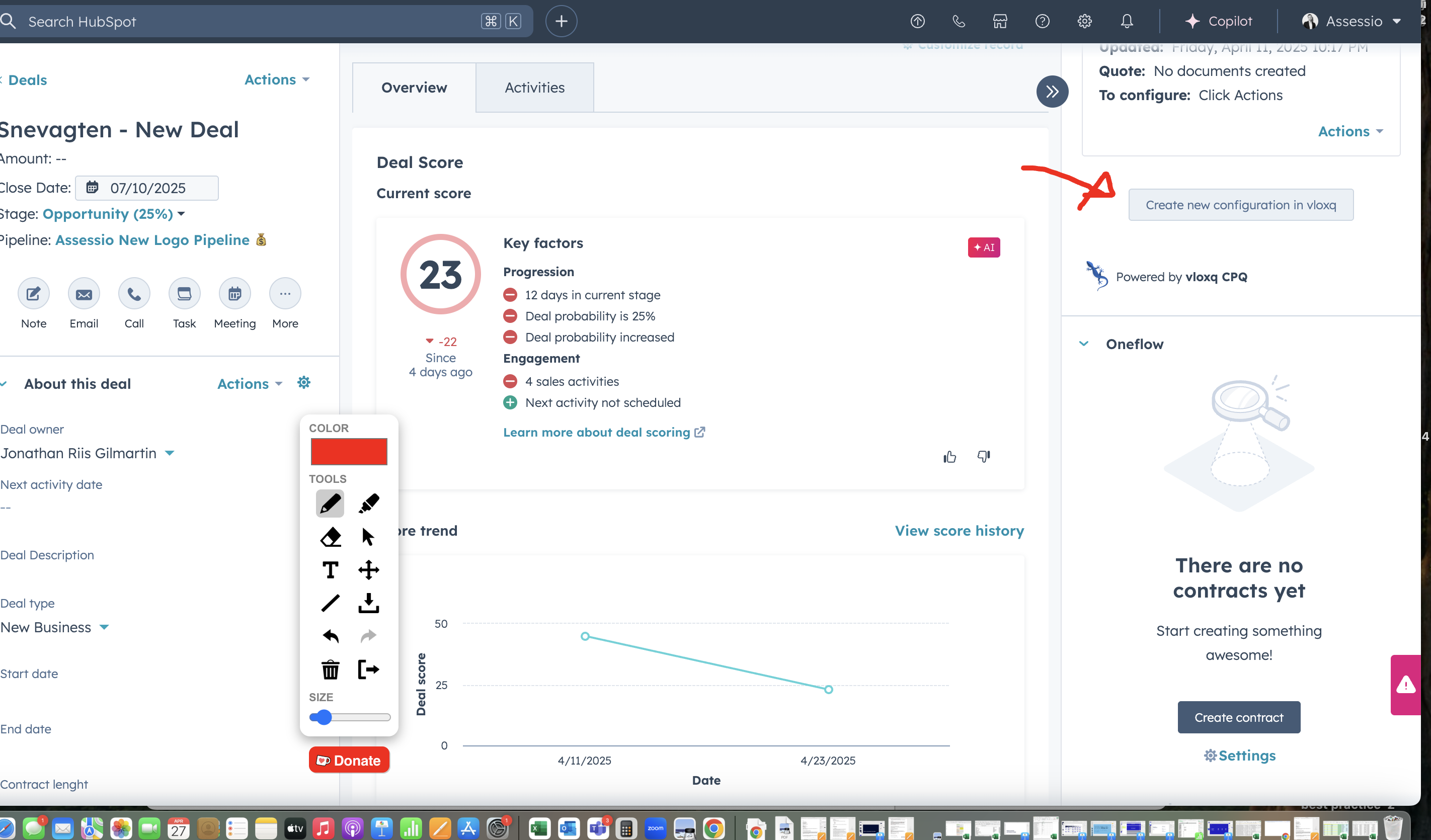
What data is transferred into Vloxq from HubSpot:
Contact information
-
Deal: Bill to contact first name
-
Deal: Bill to contact last name
-
Company: Street address
-
Company: ZIP
-
Company: City
-
Company: Country/Region
-
Company: Company owner
-
Company: Company owner email
Deal information
-
Deal: Deal Name
-
Deal: Deal Type
-
Deal: Segment
-
Deal: Module
-
Deal: Country
-
Deal: Currency
5. Fill out contract information and click next in Vloxq
6. Choose platform and base product and click next
7. Set price per product, discount, and activate rampups (if wanted)
8. Click "Create quote" and "Send to Hubspot"
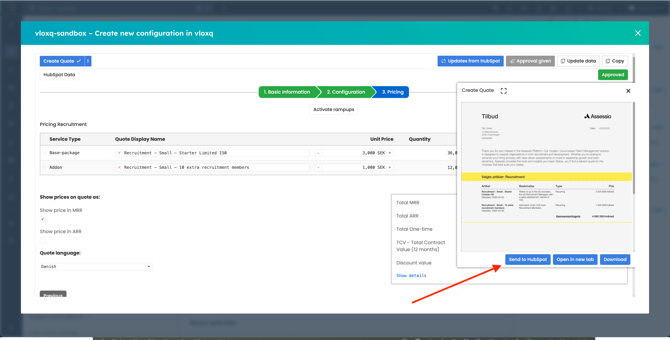
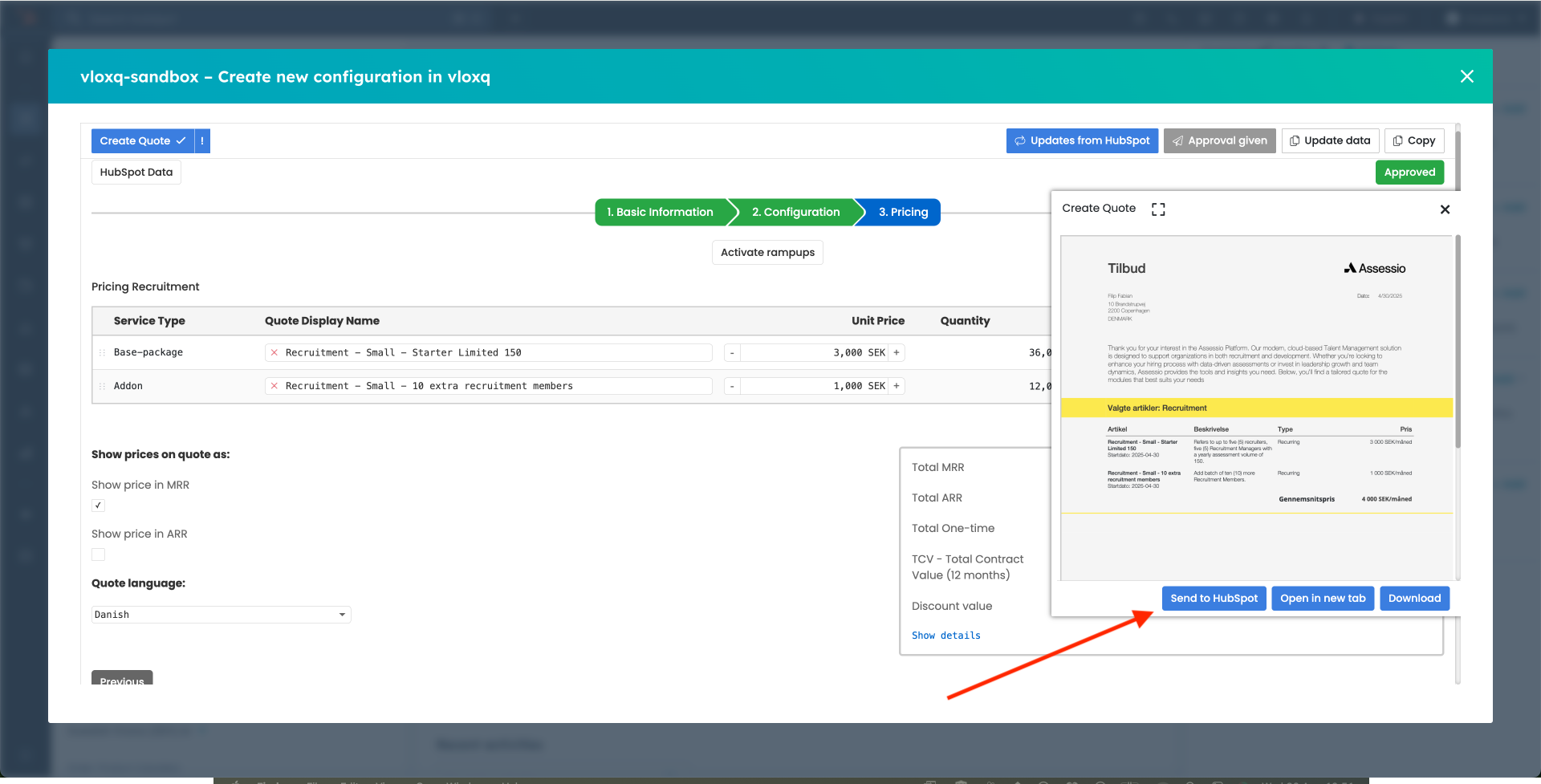
9. Information automatically added to deal in HubSpot → Line items were created and the created Quote was added to Attachments
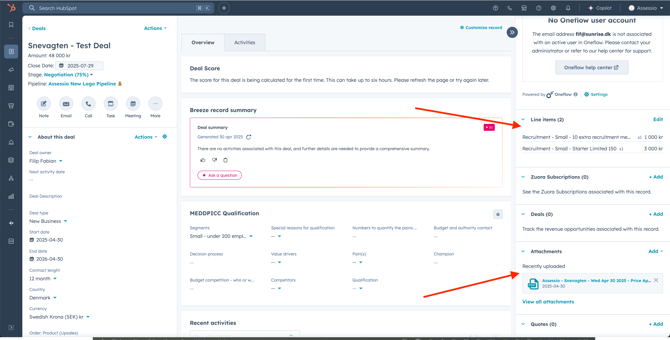
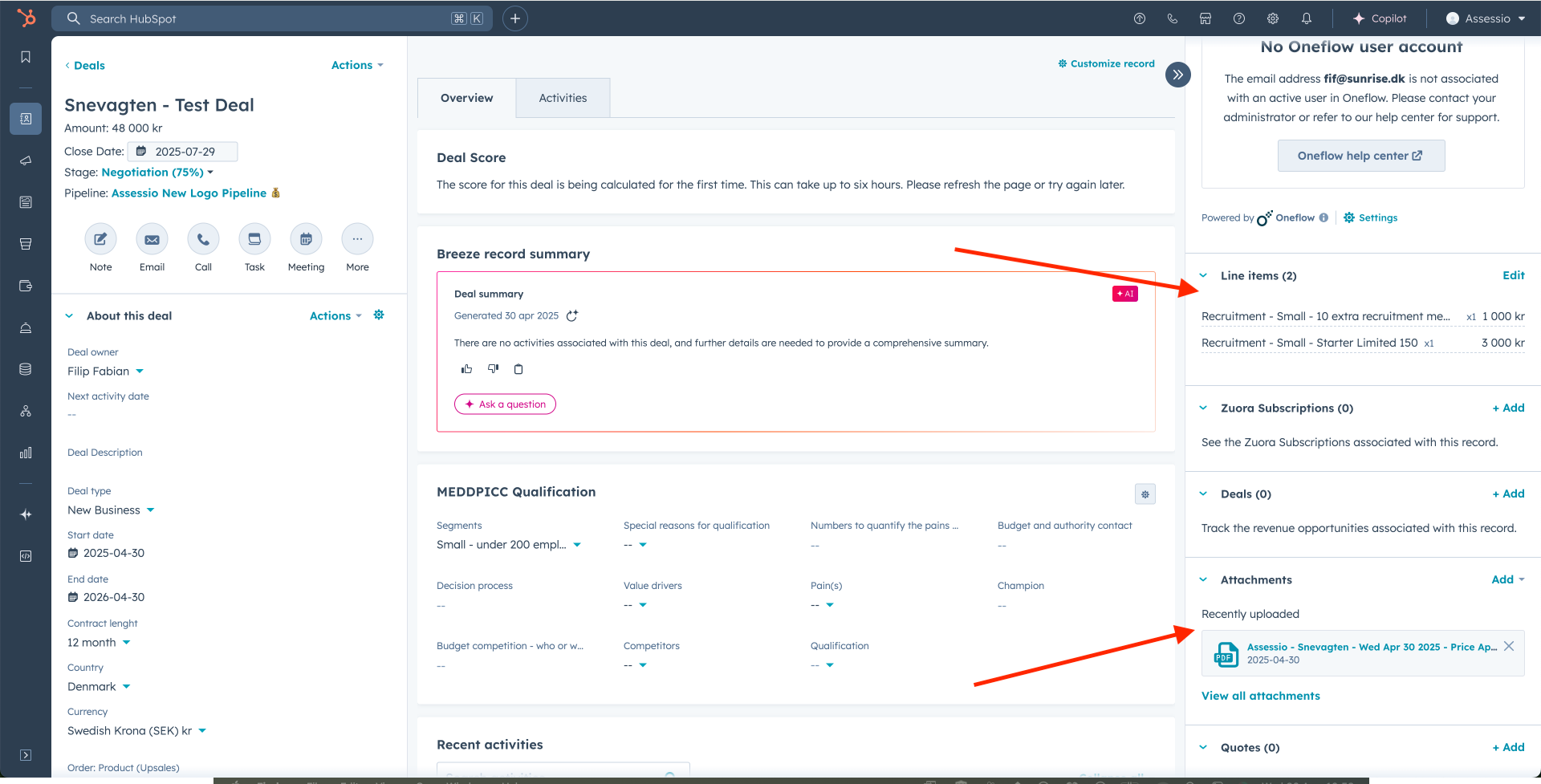
What data is added to HubSpot from Vloxq:
-
Subscription name
-
SKU
-
Invoice display name
-
Autorenew
-
Billing cycle
-
Billing frequency
-
Calculated MRR
-
Close date
-
Contract length
-
Currency in quote
-
Deal Amount
-
Description
-
End date
-
One off charge
-
Product ID
-
Ramp line item?
-
Revenue subscription type
-
Start date
-
Term
-
Total contract value
-
Type
-
Unit
-
Zuora ID
-
Quote date
-
Renewal term
-
Notice period
10. Move deal to Closed won | Handover - add invoice data and fill required properties
This triggers Sunrise middleware, via this workflow: https://app-eu1.hubspot.com/workflows/145462006/platform/flow/2060029121/edit
The workflow sends a webhook to the Sunrise middleware and initiates the next steps.
11. Subscriptions automatically created in HubSpot
This is handled by Sunrise middleware
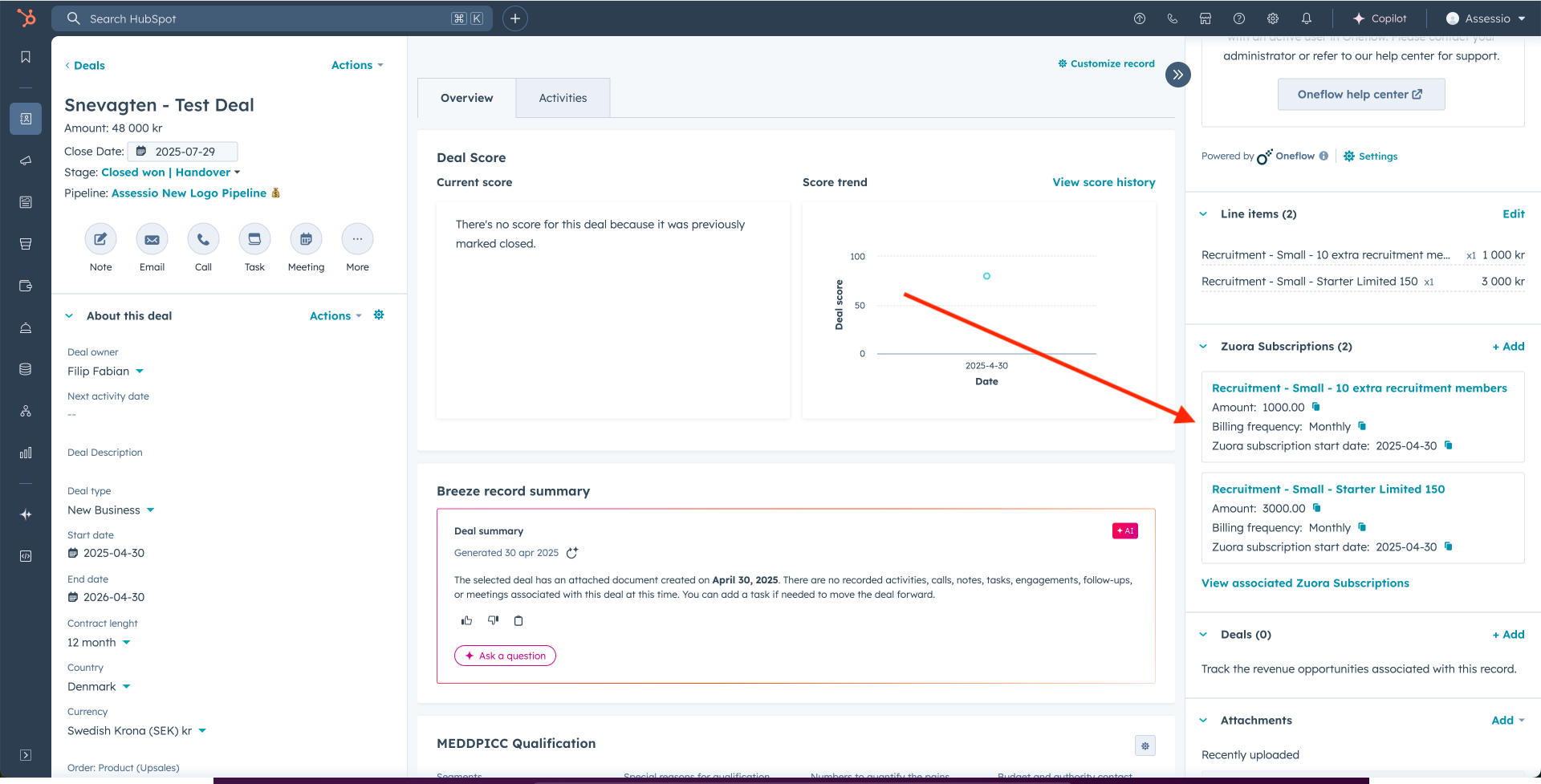
12. Account created in Zuora
This is handled by Sunrise middleware
Zuora receives the following data from HubSpot to create a new Account. The fields on the left represent the data points in HubSpot, while the fields on the right indicate the corresponding fields in Zuora where the values are mapped. There is a (MANDATORY) mark on the data fields that need to be filled in HubSpot in order to create a record in Zuora.
-
-
"companyId" = companyId (MANDATORY)
-
"deal_id" = dealId (MANDATORY)
-
"hs_owner_id" = companyOwnerId
-
"zuora_account_id" = companyZuoraId
-
"zuora_account_number" = companyZuoraNumber
-
"legal_entity_name" = companyLegalEntityName (MANDATORY - has to be one of the dropdown options)
-
"sales_rep" = companySalesRep (MANDATORY)
-
"address" = companyAddress
-
"city" = companyCity
-
"country" = companyCountry (MANDATORY)
-
"bill_to_first_name" = companyBillToFirstName (MANDATORY)
-
"bill_to_last_name" = companyBillToLastName (MANDATORY)
-
"zip" = companyZip
-
"invoicing_email" = companyInvoicingEmail (MANDATORY - has to be email format)
-
"payment_method" = companyPaymentMethod
-
"assesio_industry" = companyIndustry
-
"name" = companyName (MANDATORY)
-
"po_number" = companyPoNumber
-
"segment" = companySegment
-
"vat" = companyVat (MANDATORY)
-
"currency" = companyCurrency (MANDATORY)
-
"legal_entity_country" = companyLegalEntityCountry (MANDATORY - has to be one of the dropdown options)
-
"corporate_id" = companyCorporateId
-
After that, Zuora sends the following values back to HubSpot. Names in HubSpot on the left side, names in Zuora on the right side.
-
company_hsid - companyId
-
zuora_account_id - companyZuoraId
-
zuora_account_number - companyZuoraNumber
13. Order created in Zuora
This is handled by Sunrise middleware
Zuora receives the following data from HubSpot to create a new Order. The fields on the left represent the data points in HubSpot, while the fields on the right indicate the corresponding fields in Zuora where the values are mapped.
-
"existingAccountNumber" = customer_account_number (MANDATORY)
-
"orderDate" = order_date (MANDATORY)
-
"orderLineItems" = payload_line_items
-
"subscriptions" = payload_subscriptions
-
"description" = order_description
14. Subscription created in Zuora
This is handled by Sunrise middleware
Zuora receives the following data from HubSpot to create a new Subscription. The fields on the left represent the data points in HubSpot, while the fields on the right indicate the corresponding fields in Zuora where the values are mapped.
-
"company_id" = company_id (MANDATORY)
-
"deal_id" = deal_id (MANDATORY)
-
"subscription_id" = subscription_id (MANDATORY)
-
"upsales_id" = upsales_id
-
"invoice_display_note" = invoice_display_note
-
"line_item_id" = line_item_id
-
"main_level_1" = main_level_1
-
"main_level_2" = main_level_2
-
"name" = name
-
"quantity" = quantity
-
"ramp_1_price" = ramp_1_price
-
"ramp_2_price" = ramp_2_price
-
"ramp_3_price" = ramp_3_price
-
"ramp_4_price" = ramp_4_price
-
"ramp_5_price" = ramp_5_price
-
"ramp_interval_1_end_date" = ramp_interval_1_end_date
-
"ramp_interval_1_start_date" = ramp_interval_1_start_date
-
"ramp_interval_2_end_date" = ramp_interval_2_end_date
-
"ramp_interval_2_start_date" = ramp_interval_2_start_date
-
"ramp_interval_3_end_date" = ramp_interval_3_end_date
-
"ramp_interval_3_start_date" = ramp_interval_3_start_date
-
"ramp_interval_4_end_date" = ramp_interval_4_end_date
-
"ramp_interval_4_start_date" = ramp_interval_4_start_date
-
"ramp_interval_5_end_date" = ramp_interval_5_end_date
-
"ramp_interval_5_start_date" = ramp_interval_5_start_date
-
"ramp_line_item_" = ramp_line_item_
-
"ramp_product_is_part_of" = ramp_product_is_part_of
-
"recurringbillingfrequency" = recurringbillingfrequency
-
"subscription_name" = subscription_name
-
"type" = type (MANDATORY)
-
"zuora_auto_renew" = zuora_auto_renew
-
"zuora_billing_period" = zuora_billing_period
-
"zuora_billing_terms" = zuora_billing_terms
-
"zuora_currency" = zuora_currency
-
"zuora_price" = zuora_price
-
"zuora_product_id" = zuora_product_id
-
"zuora_product_sku" = zuora_product_sku
-
"zuora_renewal_term_period_type" = zuora_renewal_term_period_type
-
"zuora_subscription_end_date" = zuora_subscription_end_date
-
"zuora_subscription_start_date" = zuora_subscription_start_date
-
"zuora_term_end_date" = zuora_term_end_date
-
"zuora_term_start_date" = zuora_term_start_date
-
"zuora_product_rate_plan_charge_id" = zuora_product_rate_plan_charge_id
-
"zuora_company_id" = zuora_company_id
-
"zuora_company_number" = zuora_company_number
-
"initial_term" = initial_term (MANDATORY)
-
"product_rate_plan_id" = product_rate_plan_id
-
"renewal_term_period_type" = renewal_term_period_type
-
"renewal_term" = renewal_term
-
"initial_term_period_type" = initial_term_period_type (MANDATORY)
-
"description" = description
-
"po_number" = deal_po_number
-
"invoicing_in_advance" = invoicing_in_advance
-
"deal_payment_term" = payment_term
-
"ramp_line_item_" = ramp_line_item
15. If there is non-recurring - create sales order line item Insert what data is added and where in Zuora.
The fields on the left represent the data points in HubSpot, while the fields on the right indicate the corresponding fields in Zuora where the values are mapped.
-
"main_level_1" = main_level_1
-
"zuora_term_start_date" = zuora_term_start_date
-
"zuora_term_end_date" = zuora_term_end_date
-
"zuora_company_number" = zuora_company_number
-
"description" = description
-
"po_number" = po_number
-
"quantity" = quantity
-
"zuora_price" = zuora_price
-
"zuora_product_rate_plan_charge_id" = zuora_product_rate_plan_charge_id
-
"name" = name
ERRORS IN THE INTEGRATION
If the mandatory fields are not filled in or if the data entered does not meet the expected format (for example, missing “@” in the invoicing email or using invalid characters in numeric fields), the workflow will not proceed with order creation.
In such cases, a dedicated error handling workflow is triggered to manage the issue. This workflow automatically:
-
Creates a note on the associated HubSpot record (company or deal) describing the error details.
-
Updates the “Zuora error” and “Zuora order creation error” properties with specific information about the failed validation.
-
Sends an email notification to Christoffer Brodin, Jonathan Gilmartin, and Hanna Millegård, informing them about the error and the affected record.
ERROR MESSAGE
Link to the error workflow: https://app-eu1.hubspot.com/workflows/145462006/platform/flow/2095401181/edit/actions/1/extension
Once the incorrect or missing data has been corrected in HubSpot, the main workflow can be retried manually to proceed with the order creation process, as the workflow only attempts execution once per record and does not automatically retry.
SUCCESS MESSAGE
Additionally, when the integration completes successfully, a separate workflow is triggered to send a success message, confirming that the order, subscription, and account were created in Zuora without errors. This ensures clear communication for both error handling and successful processing.
Link to the success workflow: https://app-eu1.hubspot.com/workflows/145462006/platform/flow/2334005489/edit/actions/enrollment/filters
MONITORING ERRORS
1. Admin Panel
The middleware is structured with dedicated microservices for each type of action, which allows us to pinpoint exactly where an integration error occurs and streamline troubleshooting. All records and corresponding error messages can be viewed in the middleware’s administration panel (Plesk/phpMyAdmin) for monitoring and troubleshooting purposes.
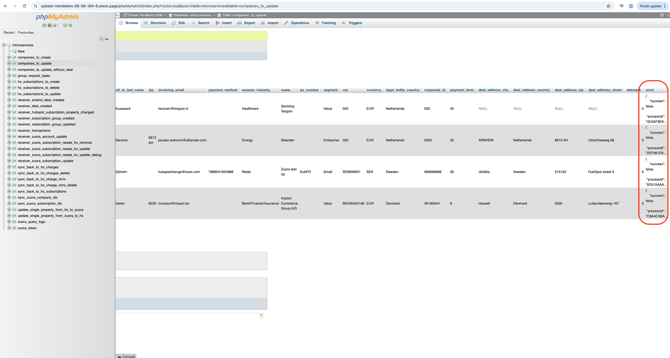
In the integration from Zuora to HubSpot, not all data fields are pushed; instead, the system identifies which fields have been updated in Zuora and only synchronizes those changes to HubSpot. Each editable field has a dedicated workflow (MHL - UNIQUE - Object Name - Data field name) in HubSpot that is triggered whenever its value is updated.
Example: https://app-eu1.hubspot.com/workflows/145462006/platform/flow/2800230619/edit
2. Audit Logs
HubSpot maintains detailed audit logs for all properties, allowing changes to be tracked over time. Each property update is recorded with information about who made the change, when it occurred, and the previous and new values. Users can view the full audit log or inspect the see history for individual properties.
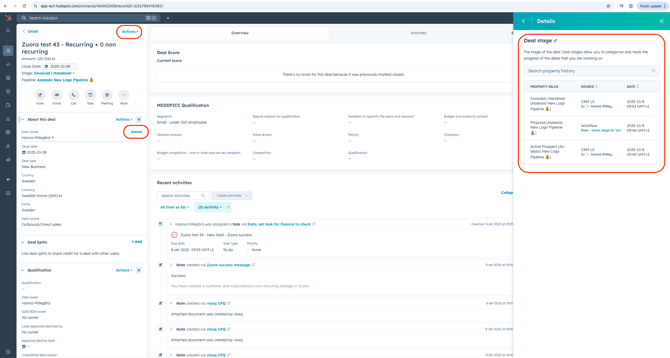
3. Integration Status Dashboard
A Zuora integration status dashboard has been built in HubSpot, providing an overview of successful creations, deals processed in Zuora, and a list of integration errors for easy monitoring.
Link to the dashboard: https://app-eu1.hubspot.com/reports-dashboard/145462006/view/109458989
ZUORA CONFIGURATION AND MIDDLEWARE TRIGGER WORKFLOWS (Christoffer)
2/3. Upgrade on an existing customer or contraction of part of subscription with new contract
The scenario is also covered in above flowchart. The main difference, is here the existing subscription will be pulled into first Vloxq the CPQ tool and then populated in HubSpot on the deal level and line item level. A corresponding Zuora ID, will make it possible to create an update order in Zuora, which removes/adds the subscriptions that should be part of the upgrade.
The upgrade is only sent to Zuora, when the deal is moved to closed on in HubSpot. Until then it sits as a potential upgrade in the pipeline.
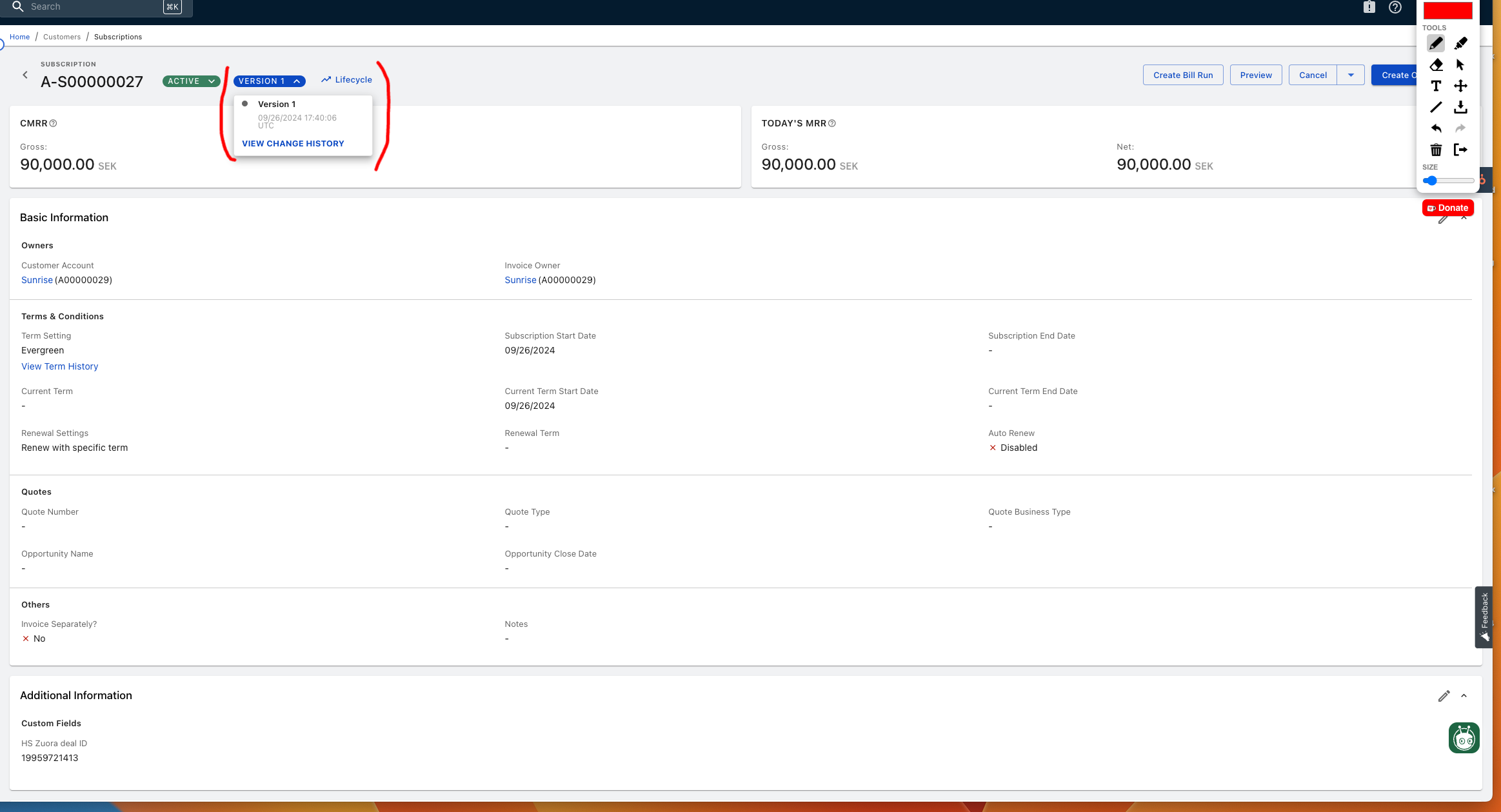
Zuoras versions history/lifecycle stage will make it possible to report on the change in the subscription. So the uplift can be report on.
When the upgrade/downgrade has been changed in Zuora, the subscription in HubSpot will be updated/changed depending on the scenario.
Automation trigger
HubSpot automation triggers webhook to Sunrise code to fetch data Hubspotapp-eu1.hubspot.com/workflows/145462006/platform/flow/2256315622/edit
STEP BY STEP GUIDE
-
New deal is created in HubSpot Existing customer pipeline
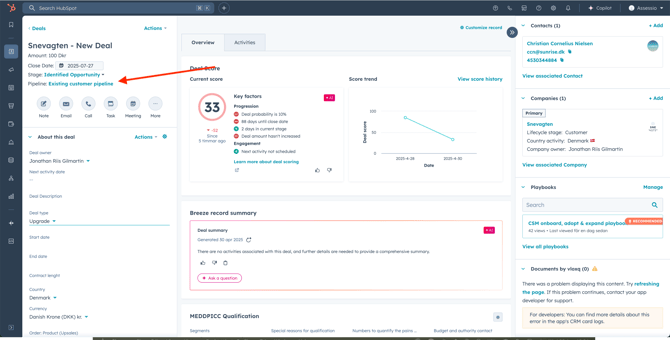
2. Vloxq is opened on deal level
3. Deal type set to existing/upgrade/contraction
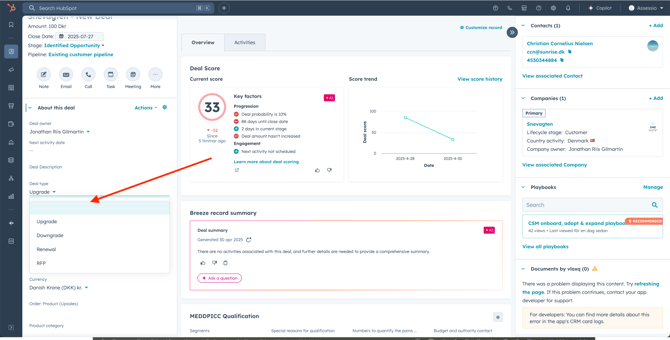
4. Vloxq will pull the different subscriptions associated with the customer
5. Sales or CS rep will pick the subscription they want to make changes to
6. Vloxq will pull those subscriptions into their pricing engine
7. Sales or CS rep will make change, add subscription, add term or any other changes to existing subscription
8. Vloxq will calculate the delta based on price of current subscriptions and the new price inputted per subscription
9. HubSpot deal is updated with the new/changed line items
Data updated going from HubSpot to Zuora:
The fields on the left represent the data points in HubSpot, while the fields on the right indicate the corresponding fields in Zuora where the values are mapped.
-
"deal_hsid" = dealId
-
"company_hsid" = companyId
-
"company_zuora_id" = companyZuoraId
-
"company_zuora_number" = companyZuoraNumber
-
"deal_po_number" = dealPoNumber
-
"deal_payment_term" = dealPaymentTerm
-
"hs_id" = companyId
-
"deal_id" = dealId
-
"hs_owner_id" = companyOwnerId
-
"zuora_account_id" = companyZuoraId
-
"zuora_account_number" = companyZuoraNumber
-
"legal_entity_name" = companyLegalEntityName
-
"sales_rep" = companySalesRep
-
"address" = companyAddress
-
"city" = companyCity
-
"country" = companyCountry
-
"bill_to_first_name" = companyBillToFirstName
-
"bill_to_last_name" = companyBillToLastName
-
"zip" = companyZip
-
"invoicing_email" = companyInvoicingEmail
-
"payment_method" = companyPaymentMethod
-
"assesio_industry" = companyIndustry
-
"name" = companyName
-
"po_number" = companyPoNumber
-
"segment" = companySegment
-
"vat" = companyVat
-
"currency" = companyCurrency
-
"legal_entity_country" = companyLegalEntityCountry
-
"corporate_id" = companyCorporateId
10. Sales or CS rep sends quote to customer
11. Customer signs the quote through Oneflow
12. Signed contract lands in HubSpot
13. Sales or CS rep checks the data and if all looks good, moves the stage to "won expansion"
14. Zuora is creating an update order, this order will contain the subscriptions/one off/non-recurring charges
Data fields udpated going from HubSpot to Zuora:
-
"zuora_subscription_number" = zuora_subscription_number
-
"company_id" = company_id
-
"deal_id" = deal_id
-
"subscription_id" = subscription_id
-
"upsales_id" = upsales_id
-
"invoice_display_note" = invoice_display_note
-
"line_item_id" = line_item_id
-
"main_level_1" = main_level_1
-
"main_level_2" = main_level_2
-
"name" = name
-
"quantity" = quantity
-
"ramp_1_price" = ramp_1_price
-
"ramp_2_price" = ramp_2_price
-
"ramp_3_price" = ramp_3_price
-
"ramp_4_price" = ramp_4_price
-
"ramp_5_price" = ramp_5_price
-
"ramp_interval_1_end_date" = ramp_interval_1_end_date
-
"ramp_interval_1_start_date" = ramp_interval_1_start_date
-
"ramp_interval_2_end_date" = ramp_interval_2_end_date
-
"ramp_interval_2_start_date" = ramp_interval_2_start_date
-
"ramp_interval_3_end_date" = ramp_interval_3_end_date
-
"ramp_interval_3_start_date" = ramp_interval_3_start_date
-
"ramp_interval_4_end_date" = ramp_interval_4_end_date
-
"ramp_interval_4_start_date" = ramp_interval_4_start_date
-
"ramp_interval_5_end_date" = ramp_interval_5_end_date
-
"ramp_interval_5_start_date" = ramp_interval_5_start_date
-
"ramp_line_item_" = ramp_line_item_
-
"ramp_product_is_part_of" = ramp_product_is_part_of
-
"recurringbillingfrequency" = recurringbillingfrequency
-
"subscription_name" = subscription_name
-
"type" = type
-
"zuora_auto_renew" = zuora_auto_renew
-
"zuora_billing_period" = zuora_billing_period
-
"zuora_billing_terms" = zuora_billing_terms
-
"zuora_currency" = zuora_currency
-
"zuora_price" = zuora_price
-
"zuora_product_id" = zuora_product_id
-
"zuora_product_sku" = zuora_product_sku
-
"zuora_renewal_term_period_type" = zuora_renewal_term_period_type
-
"zuora_subscription_end_date" = zuora_subscription_end_date
-
"zuora_subscription_start_date" = zuora_subscription_start_date
-
"zuora_term_end_date" = zuora_term_end_date
-
"zuora_term_start_date" = zuora_term_start_date
-
"zuora_product_rate_plan_charge_id" = zuora_product_rate_plan_charge_id
-
"zuora_company_id" = zuora_company_id
-
"zuora_company_number" = zuora_company_number
-
"initial_term" = initial_term
-
"product_rate_plan_id" = product_rate_plan_id
-
"renewal_term_period_type" = renewal_term_period_type
-
"renewal_term" = renewal_term
-
"initial_term_period_type" = initial_term_period_type
-
"description" = description
-
"po_number" = deal_po_number
-
"invoicing_in_advance" = invoicing_in_advance
-
"deal_payment_term" = payment_term
-
"trigger_date" = trigger_date
15. The subscriptions are created or changed in HubSpot based on Zuora subscriptions
16. The version history in the subscription in Zuora will tell us what the potential upgrade or downgrade is affecting the MRR or revenue
4. Ramp up deal
We will limit ramp up intervals to 5
This is a scenario that can happen in both new sales but also upgrades/downgrades as a ramp up can be created as part of a negoation.
What is a ramp up?
It is essentially the possibility start out with one subscription/price and then over a duration of time get ramped up into a higher price, more subscriptions etc.
In Zuora it requires you to pick up the number of intervals you want, 3 for an example.
Then you set the dates for first, second and third interval.
After that the you can choose the prices of the individual subscriptions and choose which subscriptions that should be in which ramp.
A scenario example:
-
Ramp period one, contains 2 subscriptions and discount of 20%
-
Ramp period two, contains 3 subscritpions and discount of 10%
-
Ramp period three, contains 3 subscriptions and discount of 10%
Vloxq is setup to mimic these options.
STEP BY STEP EXPLANATION
-
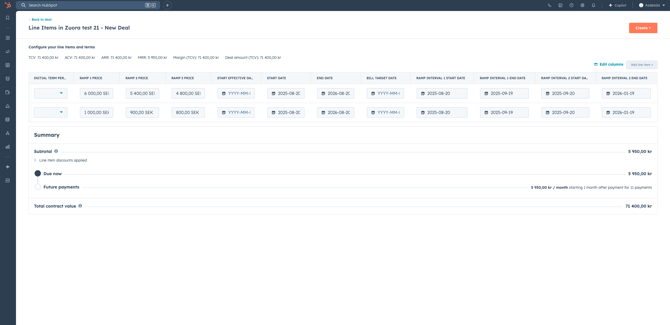
When creating new configuration in Vloxq from HubSpot, there is a button "Add Rampup Periods" which allows to add rampups.
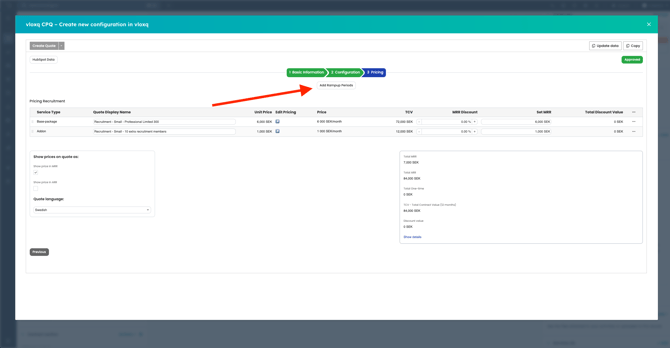
-
Add number of Rampups, dates and Global Discount.
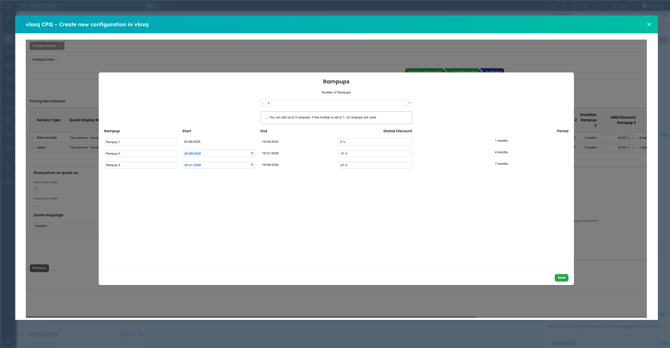
-
Once you save the Rampups, create a quote and send to HubSpot, the rampup prices and dates are saved on line items on the deal
-
Once the deal is moved to Won stage, a Subscription gets created including the rampup data
The deal contains these data fields on ramps:
-
Ramp 1 MRR
-
Ramp 2 MRR
-
Ramp 3 MRR
-
Ramp 4 MRR
-
Ramp 5 MRR
-
Ramp interval 1 start date
-
Ramp interval 2 start date
-
Ramp interval 3 start date
-
Ramp interval 4 start date
-
Ramp interval 5 start date
-
Ramp up deal?
See short video of how ramp up deals works in Zuora 
Churn
When a customer churns all or their subscriptions or just some of their subscriptions, the following steps should be taken.
-
Find customer in HubSpot
-
Create a deal with deal type= churn
-
Associated the subscriptions that is churning with the deal, and set the date for subscription to run out
-
Move the deal to cancellation in the renewal process, fill out required properties
-
This will create an order in Zuora to set the corresponding subscriptions to be cancelled upon the renewal date.
-
When the date of renewal comes and if nothing has been changed on the deal, the subscription is churned in Zuora automaically
-
If there however is a recovery and the deal is put into the deal stage "churn recovery" then the subscriptions in Zuora will not be set to churn.
-
For the scenario where the subscriptions churn, the subscription in HubSpot will be sat to "churned"
Current datamapping
Two way integration
This is handled by Sunrise middleware
Main objective is to showcase all subscriptions from Zuora in HubSpot and make it visible to the commercial teams what customer MRR and revenue data is showing.
The integration is designed to mirror Zuora’s data structure as closely as possible, creating a consistent view across both systems.
Data Structure (see more here: https://app-eu1.hubspot.com/knowledge-article/145462006/editor/271717547248/content?redirectUrl=/knowledge/145462006/269221134536/articles/state/all)
In HubSpot, the following custom objects are updated from Zuora:
-
Customer Subscription
-
Charge
-
MRR
The Customer Subscription object in HubSpot directly mirrors the Subscription object in Zuora, including all relevant data fields. Each subscription can be associated with multiple charges (both active and inactive), reflecting Zuora’s hierarchy.
A Charge in HubSpot directly mirrors Charges on a subscription in Zuora and the object can be associated with multiple MRR records, since one charge may generate several MRR entries over time.
The MRR object in HubSpot is designed to track all MRR changes on a charge over time, ensuring commercial teams have full visibility into recurring revenue evolution
Whenever a relevant data field is updated in Zuora, the changes are automatically synchronized to HubSpot. This includes creating new records and updating existing records.
Workflows:
Subscription Fields (Zuora → HubSpot: Customer Subscription)
The following fields trigger synchronization when changed in Zuora:
-
Subscription Number
-
Customer Account
-
Term Setting
-
Billing in Advance
-
Notice Period (months)
-
Subscription Start Date
-
Subscription End Date
-
Current Term Start Date
-
Current Term End Date
-
Current Term
-
Renewal Term
-
Auto Renew
-
Status
-
CMRR
-
TCV
-
Version
Charge Fields (Zuora → HubSpot: Charge + MRR Objects)
Changes in Zuora charges are mirrored in HubSpot across the Charge and MRR objects. The following fields are synchronized:
-
Charge Name
-
Charge Number
-
Charge Description
-
Invoice Display Name
-
MRR
-
Start Date
-
End Date
-
Billing Period
MRR fields (HubSpot: MRR Object)
The MRR object in HubSpot stores subscription revenue details mapped from Zuora. Key fields include:
-
subscription_number
-
version
-
zuora_mrr_id
-
product_rate_plan_charge_id
-
raw
-
date_from
-
date_to
-
value
-
charge_name
-
platform
-
created_date
-
updated_date
- https://app-eu1.hubspot.com/workflows/145462006/platform/flow/2060029121/edit -> MHL ZUORA INTEGRATION - Deal created
- https://app-eu1.hubspot.com/workflows/145462006/platform/flow/2256315622/edit -> MHL ZUORA INTEGRATION - Amend deal created
- Extract all data from the company in HubSpot
- Create a company in Zuora
- Return store Zuora ID on company in HubSpot
- Continue with deal processing
- https://app-eu1.hubspot.com/workflows/145462006/platform/flow/2386839760/edit -> Zuora - update company billing info
- https://app-eu1.hubspot.com/workflows/145462006/platform/flow/2713241817/edit -> Zuora - Changed company name
- Extract all data from the company that got updated
- Pull matching company from Zuora
- Compare monitored properties
- Update Zuora if there are differences
- There are event listeners set by @Christoffer Brodin which listen for changes there and sending data back to HubSpot
- When monitored event happens, data will be pulled, processed, compared to data in HubSpot and if needed, HubSpot will get updated
- /modes/Zuora.php
- /public/receiver_amend_deal_created.php
- /public/receiver_deal_created.php
- /public/receiver_compay_update.php
- /public/receiver_zuora_account_property_update.php
- /services/zuora/sync-companies/create.php
- /services/zuora/sync-companies/update_without_deal.php
- /services/zuora/sync-companies/update.php
- There is two way-event listening on subscriptions as well
- When any monitored data gets updated, middleware will be notified and update the other system (if there are older data there to prevent loop updating)
- /public/receiver_zuora_subscription_property_update.php
- /public/receiver_zuora_subscription_update_needed.php
- /public receiver_zuora_subscription_removal_needed.php
- /services/zuora/update_subscription_billing_properties.php
- /services/zuora/sync_subscriptions.php
- /services/zuora/sync_delete_deleted_subscriptions.php
- /services/zuora/sync_charges.php
- /services/zuora/sync_charges_delete.php
- /services/zuora/sync_charge_mrrs.php
- /services/zuora/sync_charge_mrrs_delete.php
- /services/zuora/process_update_queue.php
Background for the integration - POC done before project
POC information
HubSpot & Zuora
Zuora has a integrator built out themselves, that will come in the HubSpot marketplace in Q4. We have received access now and set it up in a HubSpot portal for you.
See more material on it here: https://knowledgecenter.zuora.com/Zuora_Platform/Integration_Hub/Billing_connector_for_HubSpot/1_Get_started_with_the_HubSpot_connector
The connector allows us to:
-
Sync companies
-
Sync price books
-
Sync deals to orders and create subscriptions + invoices from the subscriptions
The integration allows us to create a deal, add an offer to the deal with line items, sync the offer and line items with Zuora and start a subscription and send subsequent invoices.
See short video of the flow for that: 
Assessio - HubSpot and Zuora integration demo
However Zuora also has some limitations, that we have been working with Zuora to address:
-
Deals currently has to be synced manually ➝ but Zuora has agreed to built this as an automation when deal is closed won in Q4
-
Line item effective date is currently not synced ➝ Zuora has agreed to built this in Q4
-
Discounts will be built has a seperate line in the invoice in Zuora
-
Visma integration will be built as part of their implementation, Netsuite has a connector included in the price
-
Changing a subscription/upgrading/downgrading/churning requires going from HubSpot company card ➝ into Zuora and making that change manually, not optimal for all sales and cs to make changes directly to Zuora. See short video of how that would work today:
-
Automation needs to be done custom via custom api work
We have had intense dialogue with Zuora to understand how we could design a process that:
A. Delivers a smooth experience in HubSpot, that does not require you to leave HubSpot when working in sales & CS
B. Makes it possible to report on the needs of Assessio, which will be done in Zuora.
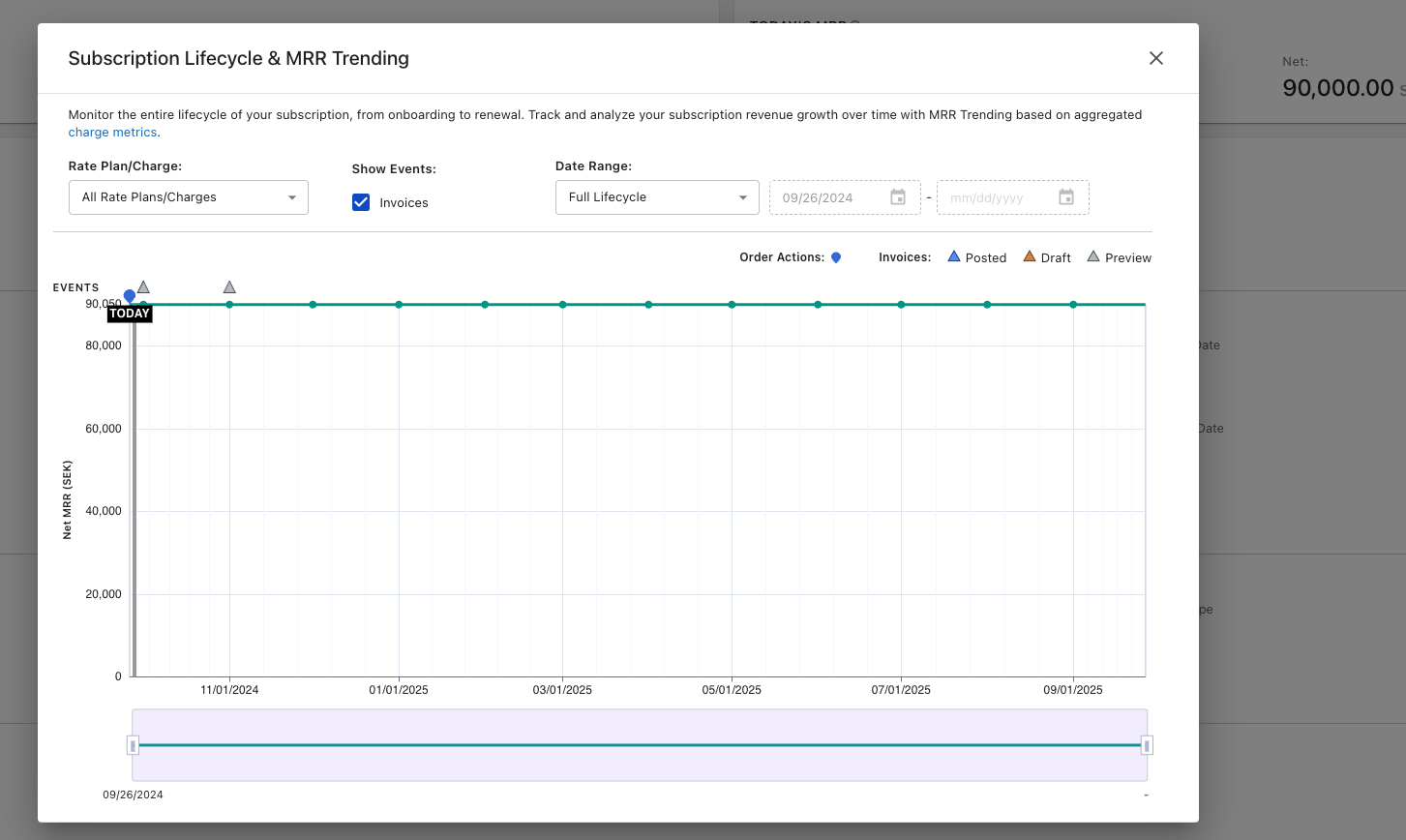
A point here, is how Zuora works. So if you have one company with one contract and subscription. If you make changes to that contract/subscription, Zuora is using versioning to track this, so you could see that a certain contract has changed x amount of times and the development in MRR, terms, products etc. This is exactly what Assessio needs, and therefor we need to make sure HubSpots data is supporting that.
See screenshot example of the Zuora versioning/lifecycle stage of a subscription
.png?width=670&height=362&name=image%20(6).png)
And here the development of the customer
.png?width=670&height=400&name=image%20(7).png)
Sunrise is recommending the following:
-
Two pipelines, one for new sales and one for renewals, upgrades, downgrades etc - both can be seen here: New logo pipeline https://app-eu1.hubspot.com/contacts/145462006/objects/0-3/views/all/board and CS pipeline: https://app-eu1.hubspot.com/contacts/145462006/objects/0-3/views/all/board
-
A approval flow, where someone from finance, approves a deal, before subscription is created in Zuora. This will prevent to much pushback between systems and departments.
-
All new customers are created when a deal is moved to closed won ➝ creating order, subscription and account in Zuora
-
All changes to existing subscriptions, are made by creating a new deal, associated to the main deal. This will then make the change to the new contract in Zuora on the chosen date. This is for both upgrades, downgrades, contraction etc. the only expection is for usage based pricing, where the scenario can be different.
For bullet 4, Sunrise has developed a "quick action button" which can be seen here, that automatically clones a deal and gives it the right association label, so the salesperson can just make the changes and then sent the new contract to the customer for them to sign. See here:
.png?width=670&height=313&name=image%20(8).png)
For more detail, please see the flowcharts created in Miro for our recommendation of the high level flows we have tested together with HubSpot, Zuora and CPQ.
Flow for Newsales
Flow for upgrades, downgrades etc
2. Sales - Pipelines, playbook, sequences, CPQ
Working with the sales setup, we are using standard elements from HubSpot. Our main task has been to convert your sales playbook into actionable items within HubSpot.
During our workshop with the sales team, it became clear that the Assessio pipeline structure was not entirely clear. We have recommended a follow-up workshop to discuss the pipeline structure, including the exit criteria for each stage. We understand this has also been addressed internally.
Link to New Logo pipeline: https://app-eu1.hubspot.com/contacts/145462006/objects/0-3/views/all/board
Working with the pipeline sets certain requirements for the data inputs we collect. In this case, we have transferred the questions from the Assessio playbook into a HubSpot Playbook. You can view an example here: https://app-eu1.hubspot.com/playbooks/145462006/compose/69974975
See video here of how the playbook works
Assessio first meeting example
The playbook acts as an assistant at each stage to ensure the correct data is collected (and so that Customer Success can have the necessary inputs when they take over the client).
Before moving deals into the pipeline, we recommend using the Lead object in HubSpot. You can see the setup here: https://app-eu1.hubspot.com/prospecting/145462006/leads/view/open-leads
The Lead object will be used to qualify incoming leads and identify potential pain points.
The entire setup is designed to facilitate the best possible reporting. With the data in place, we can report on everything from lead qualification to pipeline funnel and performance. Again, these are standard HubSpot features.
CPQ
The CPQ setup consists of two steps
-
New logo flow
-
Renewal, upsell, mixed sell
Both flows can be seen in a flowchart here:
-
New logo flow
See video flow here
2. Renewal, upsell, mixed sell
See video flow here