
What users do
-
Team members receive a short, 12-item questionnaire plus two open questions, rating whether behaviors are too little, just right, or too much.
- Leaders/HR initiate reviews, select reviewers, and view aggregated results; free-text comments are shown without author names.
Where results appear
-
Dashboard: Latest total score and trends, plus org benchmarks.
-
Performance page: Detailed scores by the four leadership competencies and review status.
-
Development page: Time series of scores, behavioral feedback, and tailored suggestions to address underdoing / just right / overdoing for each competency; reviewer comments grouped as “Do more of / Do less of.”
The model & scoring (in plain English)
-
Ratings reflect how close behaviors are to “just right” for this team at this moment.
-
Scores range 0–100; higher is better alignment. 100 means every item landed “just right.”
-
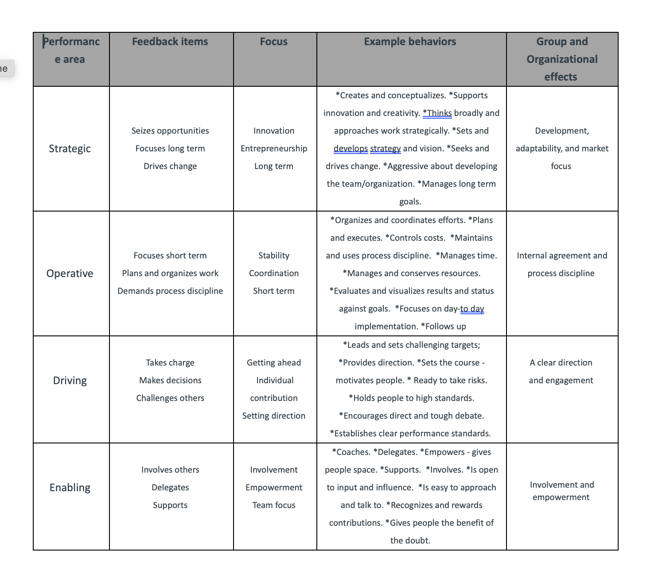
Scores are shown for the four leadership competencies (Strategic, Operative, Driving, Enabling) and combined into a total match score; optional weighting can emphasize certain competencies for a given review.
- The over/under-use concept explains why even positive behaviors can be ineffective when overdone (e.g., conscientiousness → micromanaging).
Privacy, data use & deletion
-
Results are aggregated; individual ratings aren’t shown. Free-text appears as written—avoid personal identifiers.
-
Shared with: the leader, their line-manager chain, and the HR owner/coach; org-level benchmarks are shared more broadly.
-
Deletion: HR admins can delete users; this removes written feedback for that leader while preserving historical aggregates at group level.
Running a review (quick steps)
-
Create review: name it, pick the leader, assign an owner.
-
Select reviewers: typically the leader’s team; (optionally) adjust competency weights.
-
Schedule & launch: set send date and deadline; invitations go out automatically.
Cadence: Repeat 3–4× per year to see trends, not one-off snapshots. (Page 7 and FAQ 1.3.2.5.)
Making the feedback actionable
Use the Directional goal → Actions → Checks pattern:
-
Directional goal (behavior): e.g., “Increase decision velocity” (Driving).
-
Actions: introduce a weekly decision cadence; add success criteria to top priorities.
-
Checks: decision cycle-time ↓ vs. baseline; team pulse shows ↑ clarity.
(See Development page examples of training prompts and behavior guidance.)
FAQs (short answers)
-
Is this a personality test? No—this measures behaviors the team experiences.
-
What’s a “good” score? Contextual; watch the trend. As a cue, ≥80 often surfaces as a strength.