
You need to know and use three things to log in:
-
The web address (URL) of the login page. It is something like: "assessiobloom.online/portalname".
The portalname is often the name or abreviation of the organisation the portal is used for.
-
The username. It is case-sensitive (so check the capitals).
-
The password. It is also case-sensitive (and check for spaces).
Have you forgotten the address?
-
Check the emails you've received; they often include a link that takes you directly to the correct login page. (Tip: use 'ctrl F' in your mailbox and type 'Assessio' to find your email)
Have you forgotten your username?
-
Click on 'Forgot Username?' at the bottom of the login sheet.
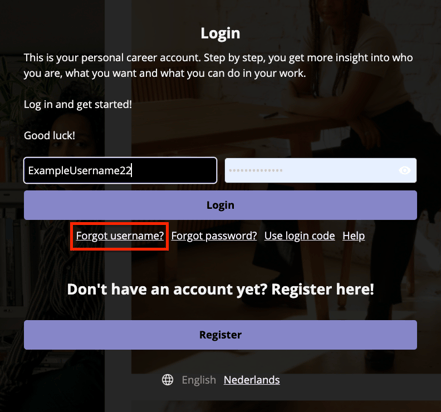
- Fill in your email address
- Fill in the Captcha
- You will receive an email from message@assessiobloom.online containing your username
- Please be aware that this email may end up in your spam folder.
Have you forgotten your password?
-
Click on 'Forgot password?'
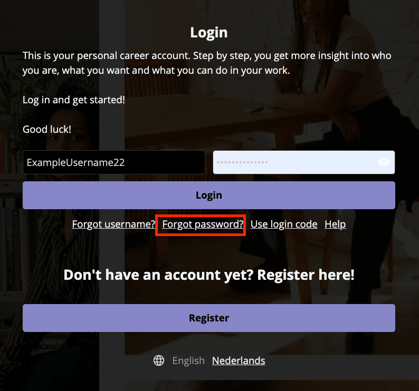
-
Fill in your Username
-
Fill in the Captcha
- You will receive an email from message@assessiobloom.online containing your password.
- Please be aware that this email may end up in your spam folder.
- When you still can't find your e-mail, ask your contact about it, or mail to support.nl @assessiobloom.com
The Captcha code doesn't work
-
Please try again. It is case sensitive. If it doesn't work, check the url, username and password.
The username or password doesn't work
- Use the 'eye' icon next to the password; you can check the spelling (check spaces and capitals)
- When logging in fails when you spelled your password correctly, there might be a spelling error in both your username, and the other way around.
Where can I find my verification code?
After you logged in, a verification can be asked for. Check your e-mail or your Authenticator app on your phone.