What’s changed
Before, results were shown on one long page. Each scale had a slider with a general description at each end. The new report is built around the candidate’s own results:
- Navigation menu: A menu on the left lists each insight: Personality, Problem solving, Values and Cognitive. Candidates can go straight to the one they want instead of scrolling the whole page.
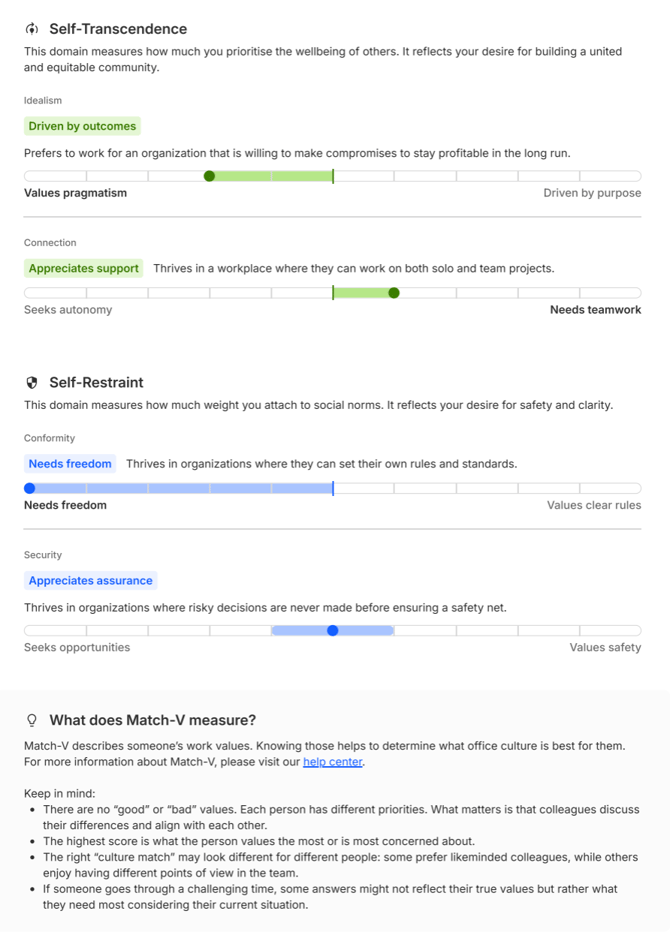
- Labels and descriptors: Each result now has a short label and a one-line description based on the candidate’s score. For example: Approachable – Is proactive and easy to approach, often adopting a positive mindset.
- More detail in Personality: Each personality, such as Social Need, Work Pace and Risk Taking has its own label and description.
- Strengths at both ends: In Personality and Values, both ends of each scale are described as strengths, for example Adaptable and Rigorous, or Needs freedom and Values clear rules.
- Colour-coded insights: Each insight and trait has its own colour and icon, so sections are easy to tell apart.
What each insight shows
- Personality (MAP): An overall label for each of the Big Five traits, plus labels for the facets within it.
- Problem solving (Matrigma): How the candidate’s performance compares with the average, with a short explanation.
- Values (Match-V): Results grouped by domain (Self-Enhancement, Self-Direction, Self-Transcendence and Self-Restraint), each with a label and description.
- Cognitive (Logics): Results for General Mental Ability, Decision Style, Logical Capacity and Skills.
Each insight ends with a “What does [assessment] measure?” section. It explains the assessment and gives candidates a few points to keep in mind when reading their results.