
Elevo is bringing itself up to date with the latest advances, and is offering a preview of the use of artificial intelligence to facilitate the identification of reviews requiring an HR perspective and potential associated actions.
The use cases are numerous: engagement, well-being, discrimination, etc.
💡 Note : This feature is only available for spaces that have subscribed to the AI option
👩🏽💻 Activating review categorization on a campaign
This option is activated in step 4 of campaign design by checking the dedicated box :
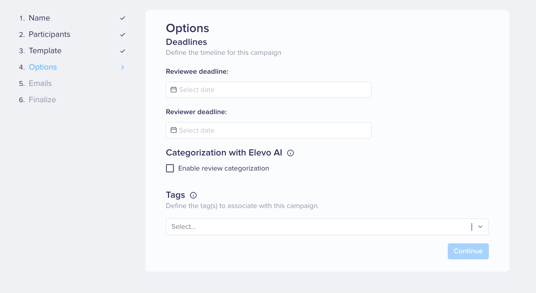
👀 AI analysis of a review
- Which reviews are eligible?
- What are AI's points of attention?
- How do I access identified reviews?
Which reviews are eligible?
The AI analyzes the selected campaigns:
- only the comments made by the reviewee,
- and only from the moment they were shared.
⚠️ Warning : For the time being, AI does not take into account comments related to objectives and skills assessment.
What are AI's points of attention?
The AI is looking for elements that may be related to :
- verbal violence,
- harassment,
- discrimination
- mental health,
- well-being,
- motivation and engagement.
If the review does not present any of these elements, it is considered as having nothing in particular to report.
How do I access identified reviews?
Once you've activated the feature on the campaign you've identified, simply check the appropriate box “See only the reviews that need your attention”.
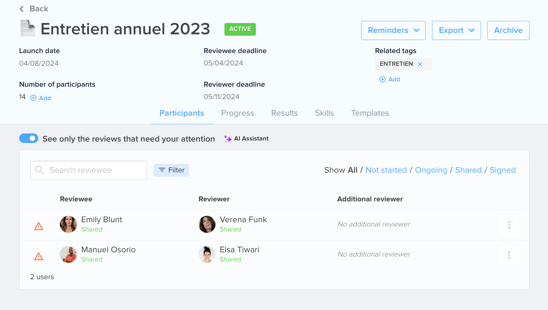
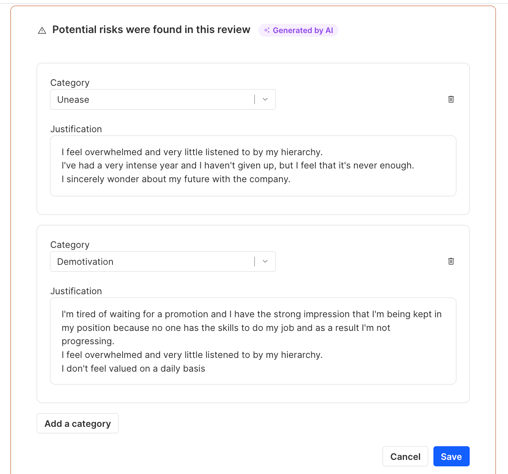
By clicking on an identified review, a block will display the various textual elements from the reviewee's comments that have led the AI Assistant to consider this review as requiring your attention.
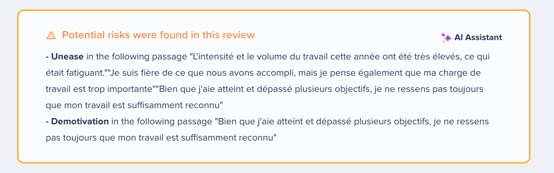
Who can edit AI-generated content?
In Reviews and 360, only Global Admins, Performance Admins and targeted Administrators of the campaign can edit or delete AI content.
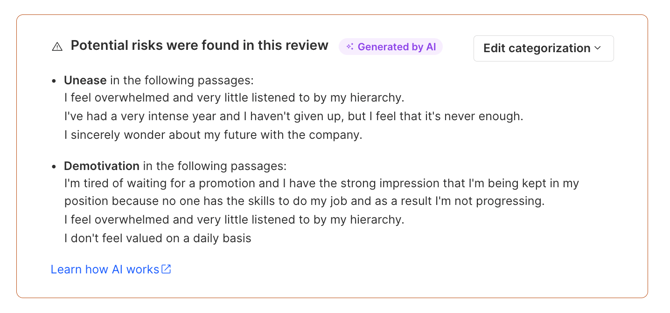
💡 Note : The most recent change is displayed along with the date, time, and the user who made the change.
Employees, managers/reviewers, target supervisors f the campaign and campaigns responsible can't edit the AI-generated content.
⚠️ Warning: Modified data will be overwritten; we do not keep a version history or the originally generated content.
Does editing AI content regenerate it or retrain the AI?
No. Editing replaces the displayed content with the admin's version. The AI is not re-run and does not learn from the correction. A deleted AI block cannot be restored.
How do I edit AI-generated content?
Click on "Edit categorization" > Modify the content > Save.
You can, for each risk:
- Modify the category,
- Modify the justification,
- Delete the risk.
💡 Note: You can also add new categories.
⚠️ Warning: Deletion of a risk is permanent.