
To access Elevo with one click, add us as a favorite 🙌🏼
On Google
- Open a new tab or window, then join the link https://app.elevo.fr/
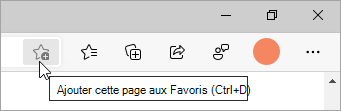
- Click on the star at the end of the URL:
- Name: Specify "Elevo"
- Folder: Favorites bar
- Click "OK" to finalize
On Firefox
- Open a new tab or window, then join the link https://app.elevo.fr/
- Click on the star at the end of the URL:
- Name: Enter "Elevo"
- Folder: Personal bar
- Click on "Save" to finalize
- Open a new tab or window, then join the link https://app.elevo.fr/
- Click on the star at the end of the URL:
- Name: Specify "Elevo"
- Folder: Personal bar
- Click "Done" to finalize
On Safari
- Open a new tab or window, then join the link https://app.elevo.fr/
- Move your mouse over the URL bar and then click and hold on the + button to the left of the URL.
- Without releasing your click move the mouse to "Favorites".
- To display the favorites bar, click on Presentation > Display Favorites Bar