
The overall system landscape
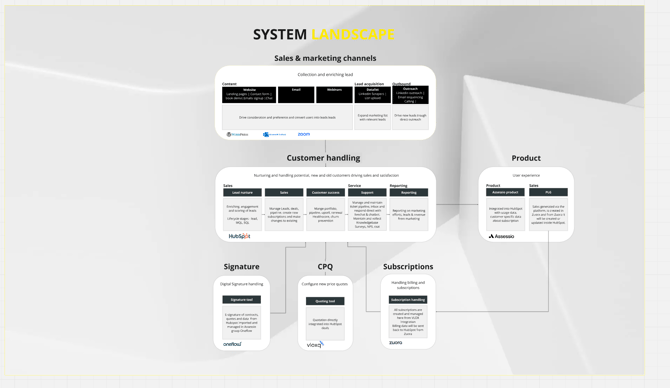
Link: https://miro.com/app/board/uXjVKmZu7EU=/?moveToWidget=3458764611073794059&cot=14
1. CRM and Property Setup
Contacts & Companies
- HubSpot is structured with standard and custom properties to reflect company and contact data, supporting sales and CS workflows.
- Custom objects (Customer Subscription, Charge, MRR) ensure all Zuora subscription data syncs to HubSpot, mirroring Zuora’s hierarchy. Each “Customer Subscription” object in HubSpot matches a Subscription object in Zuora including all essential data fields.
- See description of most important datafields on all objects: https://docs.google.com/spreadsheets/d/1vtHQfdAlwxCAYt1-nKYm5RQWS4hUZaNRA_vqOQuoL7w/edit?gid=0#gid=0
2. Sales Setup: Pipelines, Flows, and Quotes
Main Sales Pipelines
-
New Logo Pipeline
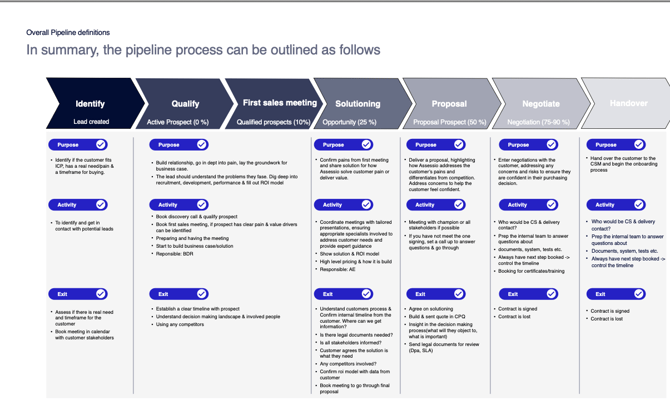
View New Logo Pipeline- Designed for brand-new prospects, moving from Identify → Qualify → First Sales Meeting → Proposal → Negotiate → Solutioning → Handover. Each stage has a clearly defined purpose, activities, and exit criteria to ensure quality progress through the funnel. After closing (“Won”), a card is created for the onboarding team, triggering coordinated handover to customer success. Pipeline definitions in the Key Sales & Marketing Document
-
Existing Customer Pipeline
View Existing Customer Pipeline-
Used to manage expansion, renewals, migrations, and upsell/cross-sell for current clients. The process covers identifying new opportunities, negotiating, contract signature, and handover to CSMs, with all criteria and flows meticulously described in the Key Sales & Marketing Document (“Existing customer pipeline,” “renewal,” “CSM structure”).
-
All pipeline stages include Purpose, Activities, and Exit Criteria, guaranteeing quality control and seamless handovers (including structured sales-to-CSM handoff).
-
See flow for overall inbound setup: https://miro.com/app/board/uXjVKmZu7EU=/?moveToWidget=3458764599411491252&cot=14 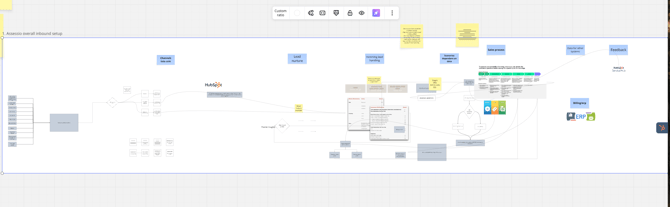
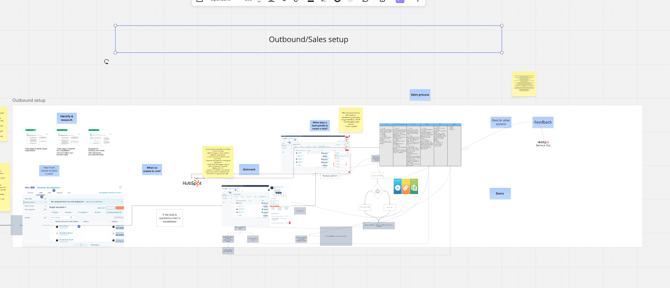
See flow for overall outbound setup:https://miro.com/app/board/uXjVKmZu7EU=/?moveToWidget=3458764600292964767&cot=14
Quote creation (Vloxq)
- See the full guide: Quotation Guide & FAQ
- The general quote workflow:
- Create a deal (in the right pipeline and deal type for your case),
- Open the Vloxq card (deal sidebar),
- Configure quote details (product(s), ramp pricing, start/end/billing dates, etc.),
- Click “Create” to push quote data to HubSpot,
- Send the quote by email, then initiate e-sign via Oneflow,
- Once signed, advance deal from “Verbal Agreement” to “Won”,
- For relevant scenarios, triggers workflow to sync to Zuora.
Scenarios—Quick Steps and Training Videos:
- New Customer
- Create deal → Open Vloxq card → Configure quote → Create/send → Trigger e-sign → Customer signs → Move to Won → Zuora sync.
- Video: New Customer Quotation Flow
- Non-Recurring (e.g., training, demo, certification)
- Mark the deal as non-recurring, set service period and billing date, the rest as above.
- Video: Non-Recurring Quotation Flow
- Upgrade/Downgrade
- Use Existing Customer pipeline, pick Upgrade/Downgrade as deal type, add current product and new price/config/quantity (add for upgrades, reduce for downgrades). Vloxq calculates deltas and supports ramp pricing if needed.
- Video: Upgrade/Downgrade Scenario
- Migrations/Conversions
- Use migration pipeline or tag the deal for conversion. Quote in Vloxq, sync, and follow normal flow.
- See FAQ for more: Quotation Guide & FAQ
- Only Vloxq can update line items—ensuring legal and billing accuracy throughout the quoting and contracting process!
3. Marketing Setup: Lead Scoring, Lifecycle, and Forms
Overall marketing flow: https://miro.com/app/board/uXjVKmZu7EU=/?moveToWidget=3458764614412139109&cot=14
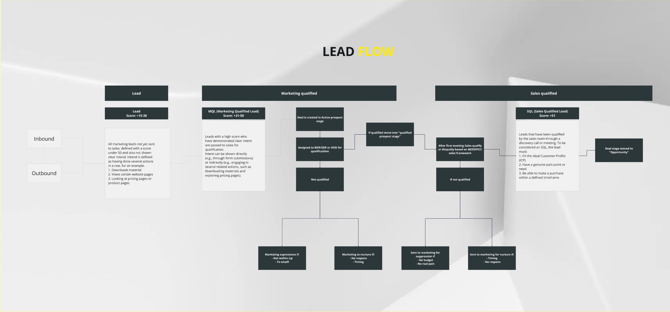
Lead Scoring & Lifecycles
- All criteria, MQL/SQL, and scoring rules are defined in the Key Sales & Marketing Document (PDF)
- The live platform scoring logic is here: Assessio Leadscore (HubSpot)
Key Marketing Workflows & Automations
- Inbound Demo Request:
Demo Request Workflow
Handles multiple demo forms; assigns based on country, sets source/country/contact owner, creates deal and puts into the correct pipeline. - Inbound Price Request:
Price Request Workflow
Routes pricing leads by country and sets proper properties; creates a deal for the correct sales owner. - Set Intent Actions:
Set Intent Actions Workflow
Manages the “high intend actions” multi-checkbox for scoring and reporting. - MQL Handoff:
MQL Handoff Workflow
When a lead score exceeds 51, automatically creates a deal and assigns to the team. - Lifecycle Stage Changes:
Lifecycle Stage Change Workflows
Workflows for auto-disqualifying MQLs, moving SQLs based on pipeline activity, etc. - Nurture Workflows (template):
Nurture Workflow Template
Use this as the basis for nurturing warm but not yet sales-ready leads. - Newsletter Signup:
Newsletter Signup Workflow
Manages newsletter subscriptions from all web forms. - Whitepaper/Download Notifications:
- NL: Notification - NL
- NO: Notification - NO
- SE: Notification - SE
- These will be consolidated as the new country-agnostic workflow structure launches.
- Alumni Lead Gen:
Alumni Lead Gen Details
Templates:
- Lead Campaign Template
- Webinar Template
- Event Template
- Country-specific test/workflow folders:
4. CSM Setup – Pipeline Details
Onboarding Pipeline
View Onboarding Pipeline
Purpose:
Ensure a streamlined handover from Sales to CSM and support a positive, rapid customer onboarding.
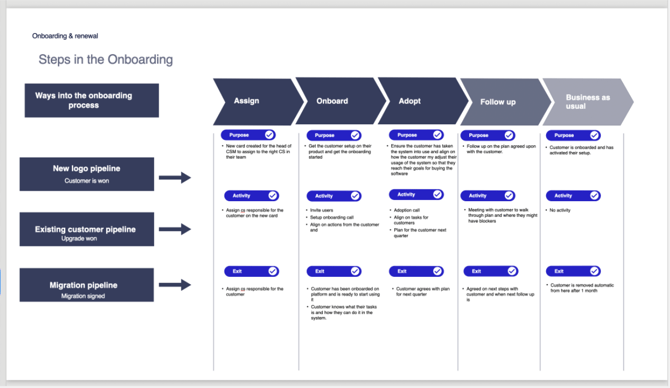
Key Activities:
- New card is created for the CSM team when the deal is won (from New Logo, Upgrade, or Migration).
- Assign responsible CSM, send onboarding information, invite users to the platform.
- Schedule onboarding calls, coordinate training/certification if needed, and complete any setup tasks.
- Align on customer tasks and log all blockers or requests.
Exit Criteria:
- Customer participates in onboarding calls and receives all access.
- CSM marks customer as “onboarded” in CRM.
- Customer is ready to start using Assessio’s platform independently.
Renewal Pipeline
Purpose:
Drive contract renewals efficiently and proactively.
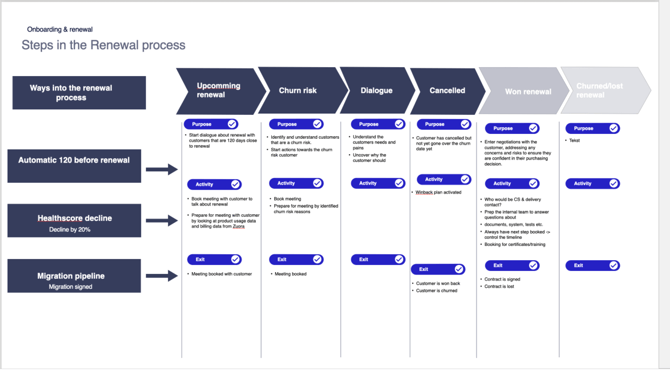
Key Activities:
- CSM contacts the customer before renewal to review contract status, usage, and satisfaction.
- If changes or upsells are needed, initiate a new quote (using Vloxq).
- Book and conduct renewal meeting, confirm agreement/changes.
Exit Criteria:
- Verbal and written (contract) renewal is received.
- CRM reflects the new agreement and, if needed, triggers onboarding/adoption for any upgrades.
Migration Pipeline
Purpose:
Support customers transitioning to new platforms, licenses, or account structures.
Key Activities:
- CSM logs migration-specific data, assigns responsible team, coordinates with customer and internal stakeholders.
- Guide the customer through migration steps, including product configuration, training, and communication.
- Trigger new quotes/contracts if applicable and update all data in CRM and Zuora.
Exit Criteria:
- Customer signs off on migration (including new contract, if needed).
- Technical/configuration steps complete, handover done.
- Migration marked as complete in CRM.
Reference documentation for each pipeline’s activities, process charts, and exit criteria is found in:
5. Zuora Integration (Both Ways)
Purpose:
- Streamlines subscription management for sales and CS—allowing creation, change, and churn of subscriptions directly within HubSpot, minimizing direct Zuora UI usage.
Documentation: Zuora Integration Purpose & Event Flow
Technical Architecture:
- Fully bidirectional sync:
- HubSpot → Zuora (on deal closure, upgrade, downgrade, churn)
- Zuora → HubSpot (subscription status, revenue, and product data synced as custom objects).
See flowhcart here: https://miro.com/app/board/uXjVKmZu7EU=/?moveToWidget=3458764637656790803&cot=14
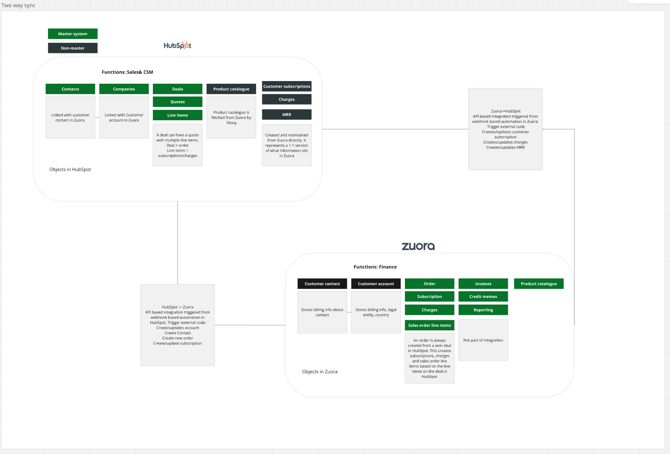
Key Event Flows & Triggers:
- New customer: Deal to closed won triggers Zuora account + subscription creation and syncs back into HubSpot. Workflow sending data to Zuora: Zuora - create customer and order etc
- Upgrade/downgrade/ramp: Triggers tasks for finance and manually created currently
- Churn: Reflected back as “churned” in HubSpot.
- Workflow example: Zuora Automation
- Mapping/details: Zuora Data Mapping Sheet
Limitations & Roadmap:
- Some items (autosync, dates, complex discounts/upgrades) are being developed.
Diagrams & Further Info:
References & Support Links
- Assessio HubSpot Help Center: https://helpcenter2.assessio.com/hubspot-internal
- Zuora Integration Datamapping Sheet: Google Sheet
- HubSpot Workflow Examples: Zuora Automation
- Leadscore Model: Assessio Leadscore (HubSpot)
- Pipeline definitions: Key Sales & Marketing Document
6. Dashboards
Full documentation: Dashboard Documentation – Assessio Help Center
Marketing Dashboards
-
Day-to-Day Marketing Ops Dashboard
Purpose: Provides daily insights into ongoing marketing activities and helps marketing and sales collaborate on active leads.
Use: See quick overviews of marketing efforts, campaign success, and lead flow.
Link: Day-to-Day Marketing Dashboard (HubSpotReports) (Example for NO market, available for each country) -
Head of Marketing Dashboard
Purpose: Distributed per country, gives marketing leads an overview covering:- Total and new leads, MQL, SQL conversion, campaign/source analysis
- Performance tracking for leads by industry, campaign, or segment
Links for major countries:- DK Head of Marketing
- SE Head of Marketing
- NL Head of Marketing
- NO Head of Marketing
(Available per region, same template)
Sales Dashboards
-
Sales Rep Template
Purpose: Shows each sales rep their activities, pipeline, forecast, MRR/ARR, conversion rate, and personal pipeline health.
Link: Sales Rep Dashboard Example (NO market) -
Head of Sales Dashboard
Purpose: For country sales leaders to monitor new deals, forecasts (monthly, quarterly, yearly), rep performance, sources, and pipeline health.
Features: Activity monitoring, MRR/ARR, goal tracking, pipeline forecasting, and source analysis.
Link: Head of Sales Dashboard (template varies by country) -
SDR Report
Purpose: Specific for Sweden, tracks meeting bookings and their outcomes in the sales pipeline.
Note: Can be cloned for other regions as needed. Link to template: SDR template
CSM & Support Dashboards
-
CSM Dashboard
Purpose: Overview for Customer Success Managers—manage renewals, onboarding, customer follow-ups, and health scoring.
(Ask internally for region-specific link; structure follows the sales/marketing dashboards.) Link to dashboard: CSM dashboard -
Support Template
Purpose: Tracks support ticket volumes, statuses, categories, and average response times.
Link: Support Dashboard
Management Dashboards
-
MD Dashboard / Management Dashboard
Purpose: For local MDs to track entity performance, budgets, new and recurring MRR, and quarterly goals.
Metrics: Revenue, new customers and upgrades, forecasted/actual MRR, team target attainment, sales funnel performance.
Link: MD Dashboard / Management -
Territory Planning/Adoption Dashboards
Purpose: Support executive team, territory planning, and monitor cross-entity adoption link: Territory planning - CRO dashboard link: CRO dashboard