
Elevo uses Artificial Intelligence (AI) across several features to help users save time, analyze information, and make content easier to understand and use.
💡 Note : This feature is only available for spaces that have subscribed to the AI option
How AI works in Elevo
Depending on the feature, Elevo relies on different AI technologies:
- Mistral is used for generative AI capabilities, such as generating summaries, categorizing content, analyzing sentiment, or generating skill matrices.
- Deepl is used for translation capabilities, including the translation of skill matrices.
AI is designed to support users, not replace their judgment. Whenever AI generates or analyzes content in Elevo, we aim to make its use clear and transparent.
Where is AI used in Elevo?
AI is currently used in the following features:
| Elevo feature | AI-powered capability |
|---|---|
| Reviews | AI-generated summaries |
| Content categorization | |
| 360 Feedback | AI-generated summaries |
| Surveys | Sentiment analysis |
|
Skills |
Matrix generation |
| Matrix translation | |
|
Training |
Training suggestions based on skills assessment |
Our approach to AI compliance and transparency
Elevo follows key principles to ensure that AI-powered features are used transparently and responsibly. Elevo uses AI to enhance the user experience while maintaining transparency and user control.
AI-generated content is clearly identified
Whenever content is generated by AI, Elevo clearly indicates it in the product.
Users can therefore distinguish AI-generated content from content written directly by another user.
Users remain in control
AI-generated content is not final or immutable.
Users can edit or delete AI-generated content directly in Elevo. This ensures that users remain in control of the information displayed and used within the platform.
AI-generated content should always be reviewed by the user when it is used to support decisions or evaluations.
AI activity is traceable
Elevo maintains traceability of interactions with AI systems.
When required, Elevo is able to provide logs showing:
- what information was sent to the AI system;
- who initiated the request;
- when the request was made;
- what content was returned by the AI system to Elevo.
As part of our alignment with the EU AI Act, Elevo is progressively applying a 180-day retention period to AI-related logs.
This traceability helps provide transparency on how AI has been used within the platform.
Glossary
LLM (Large Language Model)
An AI model designed to understand and generate natural language. LLMs can perform tasks such as answering questions, summarizing information, categorizing content, or generating text.
Prompt
An instruction or request sent to an AI model to guide the response it generates. The prompt provides the AI with the context and instructions needed to perform a specific task.
Generative AI
A type of artificial intelligence capable of generating new content based on the information and instructions it receives. In Elevo, generative AI can be used for tasks such as generating summaries or skill matrices.
AI Act
A European Union regulation establishing rules for the development and use of artificial intelligence. It aims to promote safe and transparent AI while protecting fundamental rights and supporting innovation.
How each AI-powered feature works
For greater transparency, the following sections explain how AI works for each feature, including what information is processed and what the AI produces.
- How each AI-powered feature works : Reviews & Review Summarization
- How each AI-powered feature works : Reviews & Review Categorization
- How each AI-powered feature works : 360 Feedback & Feedback Summarization
- How each AI-powered feature works : Surveys & Sentiment Analysis
- How each AI-powered feature works : Skills & AI-generated Matrices
- How each AI-powered feature works : Skills & Matrices translation
How each AI-powered feature works : Reviews & Review Summarization
Activating review summarization on a campaign
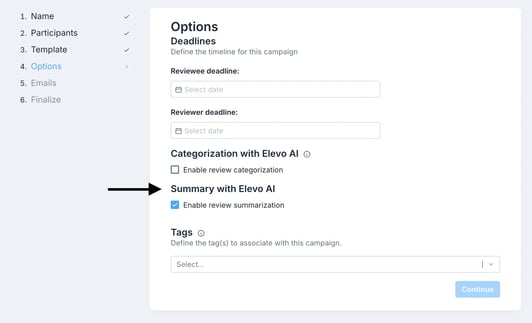
This option is enabled in step 4 of the campaign design process (the corresponding checkbox is checked by default):
Who can see the review summary?
All persons with access to the review can view the summary: reviewees, reviewer(s), line manager(s) and admins.
At what point is the summary generated?
The summary is generated once the main reviewer has shared his comments.
What elements of the review are taken into account to generate the summary?
The comments and answers of the reviewee and reviewers are taken into account.
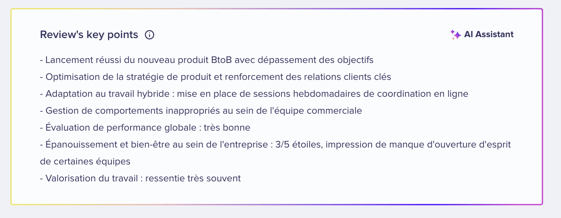
💡 Note : For the moment, the AI does not take into account comments related to objectives and skills assessment.
How is the summary generated?
The AI is instructed to summarize the key information from the review into a few concise points, based solely on the content provided by the reviewee and reviewers.
If there is not enough information available to generate a meaningful summary, no summary will be generated.
Can the AI-generated summary be edited or deleted?
Yes. The AI-generated summary remains fully under your control.
The following users can edit the content of the summary, or permanently delete the AI-generated summary block for a specific review:
- Global Admins;
- Performance Admins;
- Targeted Admins who have the appropriate permissions for the campaign.
💡 Note: Any changes made to the summary will be visible to all users who have access to it. They will also be able to see who last edited the summary and when it was last modified.
How each AI-powered feature works : Reviews & Review Categorization
Activating review categorization on a campaign
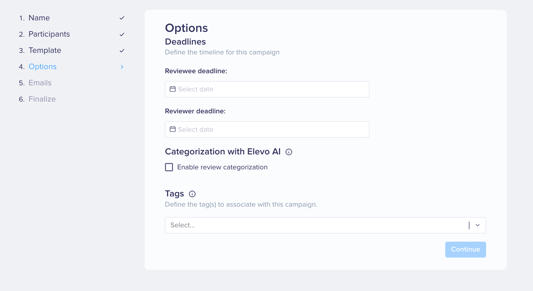
This option is activated in step 4 of campaign design by checking the dedicated box :
Which reviews are eligible?
The AI analyzes the selected campaigns:
- only the comments made by the reviewee,
- and only from the moment they were shared.
🔑 Important : For the time being, AI does not take into account comments related to objectives and skills assessment.
How does the AI identify reviews requiring attention?
We have designed a dedicated prompt to help the AI identify reviews that may require Admin attention and categorize the potential risks identified.
To guide the analysis and ensure consistent results, the AI is provided with:
- a predefined list of risk categories that can be assigned to a review;
- defined confidence and urgency levels to assess how strongly a potential risk is identified and how urgently it may require attention;
- a set of examples showing how similar situations would be assessed and categorized by a human, including the corresponding risk category, confidence level, and urgency level.
Based on these instructions and the content of the review, the AI determines whether a potential risk should be flagged and, when relevant, assigns the appropriate category and associated levels.
What are AI's points of attention?
The AI is looking for elements that may be related to :
- verbal violence,
- harassment,
- discrimination
- mental health,
- well-being,
- motivation and engagement.
If the review does not present any of these elements, it is considered as having nothing in particular to report.
How do I access identified reviews?
Once you've activated the feature on the campaign you've identified, simply check the appropriate box “See only the reviews that need your attention”.
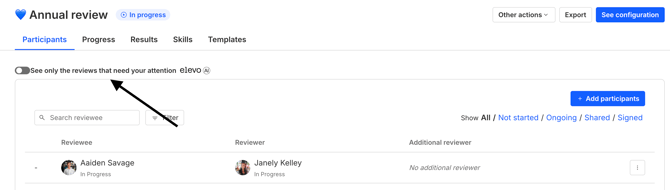
By clicking on an identified review, a block will display the various textual elements from the reviewee's comments that have led the AI Assistant to consider this review as requiring your attention.
-1.png?width=549&height=172&name=image%20(2)-1.png)
Can AI-generated categories be edited or deleted?
Yes. AI-generated categorization remains fully under your control.
The following users can manage the categorization of a review:
- Global Admins;
- Performance Admins;
- Targeted Admins who have the appropriate permissions for the campaign.
Authorized users can:
- change an existing category by selecting another category from the available list;
- edit the justification associated with a category;
- delete a specific category from the review;
- manually flag a review as requiring attention by adding a category from the available list and providing a justification;
- permanently delete the entire AI-generated categorization block for a specific review.
💡 Note: Any changes made to the categorization will be visible to all users who have access to it. They will also be able to see who last edited the categorization and when it was last modified.
How each AI-powered feature works : 360 Feedback & Feedback Summarization
Activating review categorization on a campaign
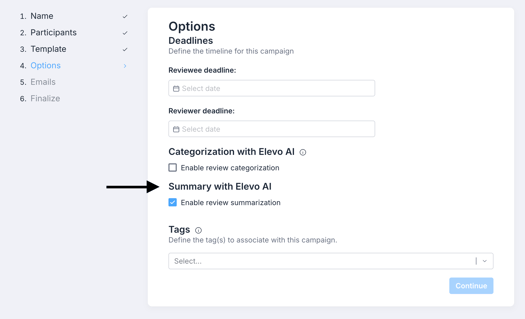
This option is enabled in step 4 of the campaign design process (the corresponding checkbox is checked by default):
Who can see the feedback summary?
Anyone who has access to the feedback can see the summary: reviewees (if shared by the reviewer), reviewer, indirect and direct managers and admins.
Peers never have access to the summary.
When is the summary generated?
The summary is generated as soon as the first peer has shared his/her comments.
What elements of 360 feedback are taken into account when generating the summary?
Comments and responses from the reviewee and peers are taken into account.
How is the summary generated?
The AI is instructed to summarize the key information from the review into a few concise points, based solely on the content provided by the reviewee and peers.
If there is not enough information available to generate a meaningful summary, no summary will be generated.
Can the AI-generated summary be edited or deleted?
Yes. The AI-generated summary remains fully under your control.
The following users can edit the content of the summary, or permanently delete the AI-generated summary block for a specific review:
- Global Admins;
- Performance Admins;
- Targeted Admins who have the appropriate permissions for the campaign.
💡 Note: Any changes made to the summary will be visible to all users who have access to it. They will also be able to see who last edited the summary and when it was last modified.
How each AI-powered feature works : Surveys & Sentiment Analysis
Analysis of text type questions
Several items are displayed here:
- The average sentiment (based on artificial intelligence).
- A graph showing the distribution of responses in %.
- The completion (to come).
-1.png?width=670&height=300&name=image%20(3)-1.png)
What is sentiment analysis?
💡 Note: Sentiment analysis can be enabled when setting up the question. It can be disabled upon request to our Support (support@elevo.io). It can not be activated after the launch.
We use an external service called Mistral. This is a French AI model. The data sent to Mistral for analysis will not be stored, but will only be used to send us back the corresponding feeling.
This sub-model is specifically trained to categorize text based on sentiment. It sets a non-visible score that then allows you to determine whether this comment has no sentiment, is negative, neutral or positive.
-1.png?width=358&height=328&name=image%20(4)-1.png)
Responses
The responses are displayed in two columns: the response and the sentiment analysis associated with the response. It is possible to filter between no feelings expressed, positive, neutral and negative in order to prioritize certain responses.
-1.png?width=562&height=271&name=image%20(5)-1.png)
Can the AI-generated sentiment be edited?
Yes. Global Admins and Survey Admins can change the sentiment identified by the AI by selecting another sentiment from the available options.
💡 Note: Any changes made to the sentiment will be visible to all users who have access to the Sentiment Analysis.
How each AI-powered feature works : Skills & AI-generated Matrices
This feature enables administrators to generate Skills and Skills Matrices using artificial intelligence. To ensure transparency regarding content origin, AI-generated content is visibly identified within the product through dedicated labels and traceability information. Administrators can subsequently edit generated content manually while preserving the indication that AI was originally involved in its creation.
Generating skills matrices with AI
This option is available in Skills and Career/ Matrices and skills:
-1.png?width=670&height=265&name=image%20(6)-1.png)
Who can view AI-generated matrices?
Once matrices are generated, they can be used as any other matrices:
- Managers and Admins can associate employees to matrices
- An employee’s matrix is accessible in their profile by Employees, Managers, Admins
- Employees have access to matrices in “My career” and “Career explorer”
- There is an option to include Skills evaluation based on the Employee’s matrix in Employee reviews
When is the matrix generated?
AI generation is triggered by an Admin (Global/ Skills). It is optional to assist administrators in creating Skills and Skills Matrices by automatically generating content.
What elements are taken into account when generating the matrix?
- The given matrix title
- The given level titles
- The given sector(s)
- Whether soft skills should be included or not
- Whether management skills should be included or not
How is the matrix generated?
The AI is instructed to respect the structure of a matrix and generate the matrix in the language and sector entered by the user, and for the job referred to by the matrix title given by the user.
The soft/management skill prompt parts are added conditionally depending on the user request. The generated skills are then available in the Skills library.
Matrices and Skills generated by AI are identified through visible tags “Generated by AI”. AI-generated labels remain visible even after manual edits.
Can the AI-generated matrix be edited or deleted?
Yes. The AI-generated matrix remains fully under your control.
Once the matrix is generated, it is unpublished. Human review by an Admin is possible before the generated matrix is published. Admins remain responsible for reviewing generated content before use in their organization.
The following users can edit the content of the matrix, including skills and matrix layout:
- Global Admins,
- Skills Admins.
💡 Note: Any changes made to the matrix will be visible to all users who have access to it. They will also be able to see when it was last edited. If the change impacts other matrices, for example shared skills, this will also mentioned on the impacted skills and matrices.
How each AI-powered feature works : Skills & Matrices translation
This feature enables administrators to generate translations of Skills and Skills Matrices using artificial intelligence. AI involvement is disclosed through visible indicators, editing capabilities, traceability information, and supporting documentation. Administrators can modify AI-generated translations while maintaining transparency regarding the translation origin.
Generating skills and matrices translation with AI
This option is available in Skills and Career/ Matrices and skills, when a matrix is selected:
-1.png?width=670&height=217&name=image%20(7)-1.png)
Once translations are available, Admins can generate new translations directly from the Translations tab as well, for instance if the reference matrix has been updated since the last translation and Admins want to reflect this change in a new translation.
-1.png?width=670&height=299&name=image%20(8)-1.png)
Who can view AI-translated skills and matrices?
Once matrices are translated, they can be used as any other matrices:
- Managers and Admins can associate employees to matrices
- An employee’s matrix is accessible in their profile by Employees, Managers, Admins
- Employees have access to matrices in “My career” and “Career explorer”
- There is an option to include Skills evaluation based on the Employee’s matrix in Employee reviews
Depending on the language of the employee the translation may be used.
When is the matrix translated?
AI translation of matrices is triggered by an Admin (Global/ Skills). It is the first step to assist administrators in providing translations for their Skills and Skills Matrices. The feature drafts AI-based translations that can be edited by Admins.
What elements are taken into account when translating a matrix?
- Matrix’s title
- Matrix’s levels’ title and description
- Linked domains’ title
- Linked areas’ title
- Linked areas’ expectations’ title and content
How is the matrix translated?
🔑 Important : We don’t interact with a LLM for this but with the DeepL API. DeepL mentions the use of AI on their side, but we only interact with an API, so we don’t send nor receive any prompt or prompt result in the whole process. For more information, refer to DeepL documentation:  DeepL DocumentationQuickstart - DeepL Documentation
When a matrix first goes to the translation action, we perform 2 actions:
1️⃣ Default locale detection
For all content of the matrix, we use DeepL to determine the default locale.
2️⃣ Translation
After that, we use DeepL to translate the matrix content to other languages set for the organization.
Matrices and Skills translated by AI are identified through visible tags “Translated by AI”. AI-translation labels remain visible even after manual edits.
Can the AI-translated matrix be edited or deleted?
Yes. The AI-translated matrix remains fully under your control.
Translations of the skills are available and editable in the Skills library.
Translations of the matrix elements are editable in the tab Translations for the selected matrix.
Human review of the translation by an Admin is possible before the translated matrix is published, provided the matrix is unpublished when the Admin triggers translations. Admins remain responsible for reviewing translated content before use in their organization.
The following users can edit the content of the matrix, including skills and matrix layout:
- Global Admins,
- Skills Admins.
💡 Note: Any changes made to the matrix will be visible to all users who have access to it. They will also be able to see when it was last edited. If the change impacts other matrices, for example shared skills, this will also mentioned on the impacted skills and matrices.